# FUNC 500: Lambda Functions in Data Distiller: Exploring Similarity Joins

## Use Cases

Here are some common use cases

1. **Data Deduplication:** In data cleansing tasks, similarity join can help identify and remove duplicate records from a dataset.&#x20;
2. **Record Linkage:** Similarity join is used in record linkage or identity resolution to identify and link records that represent the same real-world identities across multiple datasets.&#x20;
3. **Recommendation Systems:** In collaborative filtering-based recommendation systems, similarity join is used to find users or items with similar preferences.&#x20;
4. **Information Retrieval:** In information retrieval and text search, similarity join is used to retrieve documents, articles, or web pages that are similar to a given query or document.&#x20;
5. **Text Analytics:** In natural language processing (NLP) and text analysis, similarity join is used to compare and group similar text documents, sentences, or phrases. It's applied in document clustering and topic modeling.

## What is a Similarity Join?

A similarity join is an operation that identifies and retrieves pairs of records from one or more tables based on a measure of similarity between the records.&#x20;

Key requirements for a similarity join:

1. **Similarity Metric:** A similarity join relies on a predefined similarity metric or measure, such as Jaccard similarity, cosine similarity, edit distance, or others, depending on the nature of the data and the use case. This metric quantifies how similar or dissimilar two records are.
2. **Threshold:** A similarity threshold is often defined to determine when two records are considered similar enough to be included in the join result. Records with a similarity score above the threshold are considered ***matches***.

## Jaccard Similarity Measure

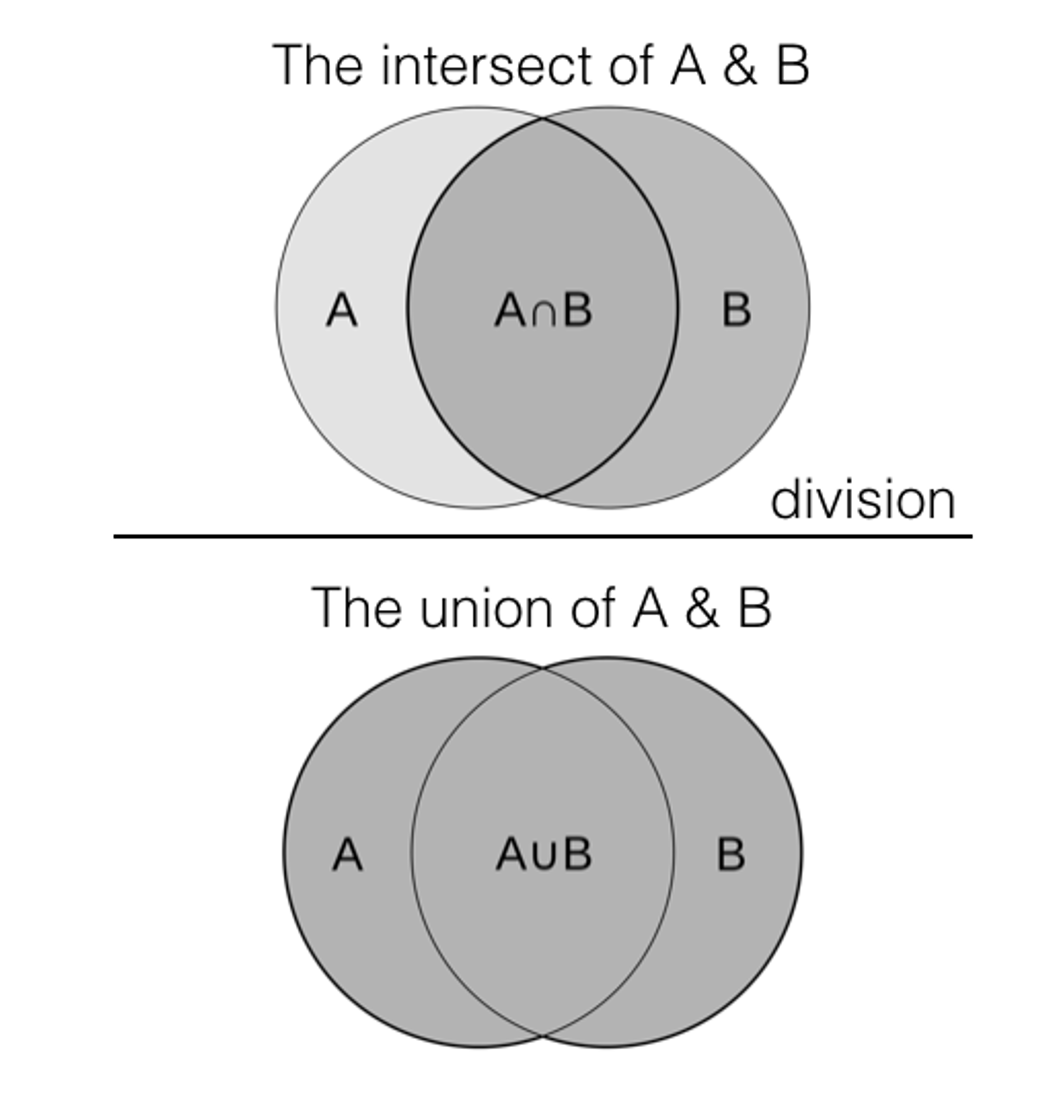
The Jaccard similarity measure is popular in many applications because of its simplicity, effectiveness, and applicability to a wide range of problems. It determines the similarity between two sets by measuring the ratio of the size of their intersection to the size of their union. It can be applied to a wide range of data types, including text data, categorical data, and binary data. Calculating Jaccard similarity can be computationally efficient for large datasets, making it suitable for real-time or batch processing.

The Jaccard similarity coefficient, often denoted as J(A, B), is defined as:

$$J(A,B)=∣A∪B∣∣A∩B∣​$$

Where:

* $$∣A∩B∣$$ represents the size (number of elements) of the intersection of sets A and B.
* $$∣A∪B∣$$ represents the size of the union of sets A and B.

<figure><img src="https://1899859430-files.gitbook.io/~/files/v0/b/gitbook-x-prod.appspot.com/o/spaces%2FEhcgqFIfGdE0GXJzi5yR%2Fuploads%2FYCiaGziAh9jHbnxWt7TV%2FScreen%20Shot%202023-09-12%20at%204.48.10%20PM.png?alt=media&#x26;token=026d0934-54b0-4bb5-878d-3e35c2eabcac" alt=""><figcaption><p>Jaccard Similarity Measure.</p></figcaption></figure>

The Jaccard similarity coefficient ranges from 0 to 1:

* A Jaccard similarity of 0 indicates no similarity between the sets (completely dissimilar).
* A Jaccard similarity of 1 indicates that the sets are identical (completely similar).

Here's a simple example to illustrate Jaccard similarity:

Suppose we have two product sets, A and B, representing the words in two documents:

* Product Set A: {iPhone, iPad, iWatch, iPad Mini}
* Product Set B: {iPhone, iPad, Macbook Pro}

To calculate the Jaccard similarity between product sets A and B:

1. Find the intersection of product sets A and B (common elements): {iPhone, iPad}
2. Find the union of product sets A and B (all unique elements): {iPhone, iPad, iWatch, iPad Mini, Macbook Pro}

Now, use the Jaccard similarity formula:

$$J(A,B)=∣A∪B∣∣A∩B∣​=2/5​=0.4$$

So, the Jaccard similarity between product sets A and B is 0.4, indicating a moderate degree of similarity between the words used in the two documents.

This is the similarity between the two sets that will become the columns in our join. But we need pairwise similarity between each element in Set A with that in Set B.

## Pairwise Jaccard Computation with String Similarity

We want to be able to compare a similarity match between the text strings of the products in Set A  and Set B.&#x20;

Let's assume we're using character bigrams (2-grams) for this calculation. A 2-gram, also known as a bigram, is a ***consecutive*** sequence of two items or elements in a given sequence or text. And you can generalize this to n-grams. Assume that the case does not matter and that spaces will not be accounted for. With these assumptions, we have:

Product Set A can be split into these '2-grams":

* **iPhone (5):** "ip", "ph", "ho", "on", "ne"
* **iPad (3):** "ip", "pa", "ad"
* **iWatch (5):** "iw", "wa", "at", "tc", "ch"
* **iPad Mini (7):** "ip", "pa", "ad", "dm", "mi", "in", "ni"

Product Set B:

* **iPhone (5):** "ip", "ph", "ho", "on", "ne"
* **iPad (3):** "ip", "pa", "ad"
* **Macbook Pro (9):** "Ma", "ac", "cb", "bo", "oo", "ok", "kp", "pr", "ro"

Now, calculate the Jaccard similarity coefficient for each pair:

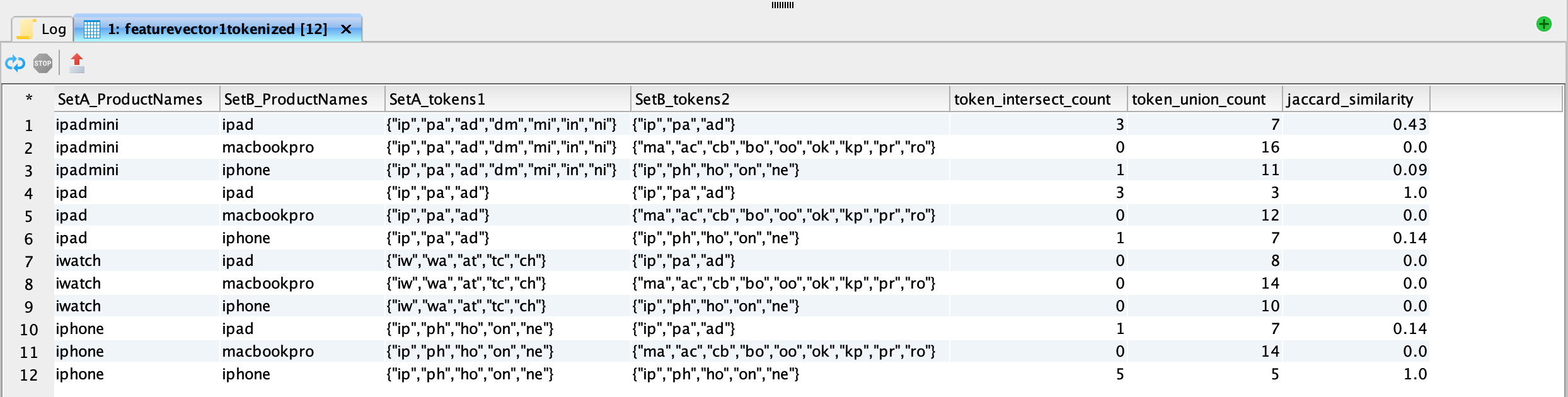
1. iPhone (Set A) with iPhone (Set B):
   * Jaccard Similarity Index: (Intersection: 5, Union: 5) = 5 / 5 = 1
2. iPhone (Set A) with iPad (Set B):
   * Jaccard Similarity Index: (Intersection: 1, Union: 7) = 1 / 7 ≈ 0.14
3. iPhone (Set A) with Macbook Pro (Set B):
   * Jaccard Similarity Index: (Intersection: 0, Union: 14) = 0 / 14 = 0
4. iPad (Set A) with iPhone (Set B):
   * Jaccard Similarity Index: (Intersection: 1, Union: 7) = 1 / 7 ≈ 0.14
5. iPad (Set A) with iPad (Set B):
   * Jaccard Similarity Index: (Intersection: 3, Union: 3) = 3 / 3 = 1
6. iPad (Set A) with Macbook Pro (Set B):
   * Jaccard Similarity Index: (Intersection: 0, Union: 12) = 0 / 12 = 0
7. iWatch (Set A) with iPhone (Set B):
   * Jaccard Similarity Index: (Intersection: 0, Union: 10) = 0 / 10 = 0
8. iWatch (Set A) with iPad (Set B):
   * Jaccard Similarity Index: (Intersection: 0, Union: 8) = 0 / 8 = 0
9. iWatch (Set A) with Macbook Pro (Set B):
   * Jaccard Similarity Index: (Intersection: 0, Union: 14) = 0 / 14 = 0
10. iPad Mini (Set A) with iPhone (Set B):
    * Jaccard Similarity Index: (Intersection: 1, Union: 11) = 1 / 11 ≈ 0.09
11. iPad Mini (Set A) with iPad (Set B):
    * Jaccard Similarity Index: (Intersection: 3, Union: 7) = 3 / 7 ≈ 0.43
12. iPad Mini (Set A) with Macbook Pro (Set B):
    * Jaccard Similarity Index: (Intersection: 0, Union: 16) = 0 / 16 = 0

We just need a threshold to identify what are truly great matches which is dependent on the dataset itself.&#x20;

## Test Data

Let us create a test table out of the example values above ***manually***:

{% code overflow="wrap" %}

```sql
CREATE TABLE featurevector1 AS SELECT *
FROM (
    SELECT 'iPad' AS ProductName
    UNION ALL
    SELECT 'iPhone'
    UNION ALL
    SELECT 'iWatch'
     UNION ALL
    SELECT 'iPad Mini'
);
SELECT * FROM featurevector1;
```

{% endcode %}

Just to make sure we understand the SQL code:

* `CREATE TEMP TABLE featurevector1 AS`: This statement creates a temporary table named `featurevector1`. Temporary tables are typically only accessible within the current session and are automatically dropped at the end of the session.
* `SELECT * FROM (...)`: This part of the code is a subquery used to generate the data that will be inserted into the `featurevector1` table.
* Inside the subquery, there are multiple `SELECT` statements combined using `UNION ALL`. Each `SELECT` statement generates one row of data with the specified values for the 'ProductName' column.
  * `SELECT 'iPad' AS ProductName`: This generates a row with the value 'iPad' in the 'ProductName' column.
  * `SELECT 'iPhone'`: This generates a row with the value 'iPhone' in the 'ProductName' column.
  * And so on.

The result will be:

<figure><img src="https://1899859430-files.gitbook.io/~/files/v0/b/gitbook-x-prod.appspot.com/o/spaces%2FEhcgqFIfGdE0GXJzi5yR%2Fuploads%2F0sKflzAZE5IU93DIqU4R%2FScreen%20Shot%202023-09-13%20at%208.54.17%20AM.png?alt=media&#x26;token=d6d2b271-8a55-4487-9fd5-a2aeeb1c0a69" alt=""><figcaption><p>Manual test data creation using SELECTs and UNION ALL</p></figcaption></figure>

Similarly, we can also create the second feature vector that looks like the following:

{% code overflow="wrap" %}

```sql
CREATE TABLE featurevector2 AS SELECT *
FROM (
    SELECT 'iPad' AS ProductName
    UNION ALL
    SELECT 'iPhone'
    UNION ALL
    SELECT 'Macbook Pro'
);
SELECT * FROM featurevector2;
```

{% endcode %}

## Old Fashioned Tokenization

Tokenization or text splitting is the process of taking text (such as a sentence) and breaking it into individual terms (usually words).&#x20;

In our case, we need to do several things:

1. We will assume that whitespaces do not contribute to the similarity measure and we will get rid of them in our feature vectors.&#x20;
2. If there are duplicates present in the feature vector, they waste computation. We should get rid of them.
3. We will need to extract tokens of 2 characters, also called as a 2-gram or bigram. In our case, we will assume that they are overlapping.&#x20;

In each of the steps, we will keep adding the processed columns right next to the feature vector for illustration purposes only.&#x20;

### Deduplication

We will use the DISTINCT clause to remove duplicates

{% code overflow="wrap" %}

```sql
SELECT DISTINCT(ProductName) AS featurevector1_distinct FROM featurevector1
```

{% endcode %}

```sql
SELECT DISTINCT(ProductName) AS featurevector2_distinct FROM featurevector2
```

In our example, this is trivial as there no duplicates.&#x20;

### Removing Whitespaces

To remove whitespaces that we have in our example, use the following:

{% code overflow="wrap" %}

```sql
SELECT DISTINCT(ProductName) AS featurevector1_distinct, replace(ProductName, ' ', '') AS featurevector1_nospaces FROM featurevector1
```

{% endcode %}

`replace(ProductName, ' ', '') AS featurevector1_nospaces`: In this part of the query, it takes the "ProductName" column from the "featurevector1" table and uses the `REPLACE` function. The `REPLACE` function replaces all occurrences of a space (' ') with an empty string (''). This effectively removes all spaces from the "ProductName" values. The result is aliased as "featurevector1\_nospaces."

The results are:

<figure><img src="https://1899859430-files.gitbook.io/~/files/v0/b/gitbook-x-prod.appspot.com/o/spaces%2FEhcgqFIfGdE0GXJzi5yR%2Fuploads%2FR13J3d1gUKO1lQ7HZaz3%2FScreen%20Shot%202023-09-13%20at%204.37.04%20PM.png?alt=media&#x26;token=1be7c61a-74c2-4c04-9a23-1111dcabb046" alt=""><figcaption><p>iPadMini has whitespaces removed</p></figcaption></figure>

{% code overflow="wrap" %}

```sql
SELECT DISTINCT(ProductName) AS featurevector2_distinct, replace(ProductName, ' ', '') AS featurevector2_nospaces FROM featurevector2
```

{% endcode %}

<figure><img src="https://1899859430-files.gitbook.io/~/files/v0/b/gitbook-x-prod.appspot.com/o/spaces%2FEhcgqFIfGdE0GXJzi5yR%2Fuploads%2FL6VXNnK8tAB7H2eDxrLB%2FScreen%20Shot%202023-09-13%20at%204.38.46%20PM.png?alt=media&#x26;token=21a8721f-c4c4-4ffc-a70e-17885f320dfb" alt=""><figcaption><p>MacbookPro has whitespaces removed</p></figcaption></figure>

### Convert All to Lowercase

Use the following code:

{% code overflow="wrap" %}

```sql
SELECT DISTINCT(ProductName) AS featurevector1_distinct, lower(replace(ProductName, ' ', '')) AS featurevector1_transform FROM featurevector1;
```

{% endcode %}

`lower(...)`: The `lower` function is applied to the result of the `REPLACE` function. The `lower` function is used to convert all characters in the modified "ProductName" values to lowercase. This ensures that the values are in lowercase regardless of their original casing.

The result will be:

<figure><img src="https://1899859430-files.gitbook.io/~/files/v0/b/gitbook-x-prod.appspot.com/o/spaces%2FEhcgqFIfGdE0GXJzi5yR%2Fuploads%2FrfR4VzVqCQRfnCa44mlh%2FScreen%20Shot%202023-09-13%20at%204.43.11%20PM.png?alt=media&#x26;token=48df249a-7bbe-4e42-bfb7-e5f525db110c" alt=""><figcaption><p>Convert all to lowercase.</p></figcaption></figure>

The same would go for the other feature vector:

{% code overflow="wrap" %}

```sql
SELECT DISTINCT(ProductName) AS featurevector2_distinct, lower(replace(ProductName, ' ', '')) AS featurevector2_transform FROM featurevector2
```

{% endcode %}

The result will be:

<figure><img src="https://1899859430-files.gitbook.io/~/files/v0/b/gitbook-x-prod.appspot.com/o/spaces%2FEhcgqFIfGdE0GXJzi5yR%2Fuploads%2FRcdEH1BQTWZ4csWamdJN%2FScreen%20Shot%202023-09-13%20at%204.45.26%20PM.png?alt=media&#x26;token=05883676-fa28-4b0d-9d80-edc414d1f9ac" alt=""><figcaption><p>Convert all to lowercase.</p></figcaption></figure>

### Create the Tokens

To create the tokens, we will use `regexp_extract_all`

{% code overflow="wrap" %}

```sql
SELECT DISTINCT(ProductName) AS featurevector1_distinct, lower(replace(ProductName, ' ', '')) AS featurevector1_transform, 
regexp_extract_all(lower(replace(ProductName, ' ', '')) , '.{2}', 0) AS tokens
FROM featurevector1;
```

{% endcode %}

Some code explanation:

1. `regexp_extract_all(lower(replace(ProductName, ' ', '')), '.{2}', 0) AS tokens`: This part of the query further processes the modified "ProductName" values created in the previous step. It uses the `regexp_extract_all` function to extract all non-overlapping substrings of 1 to 2 characters from the modified and lowercase "ProductName" values. The `'.{2}'` regular expression pattern matches substrings of 2 characters in length.
2. &#x20;`regexp_extract_all(..., '.{2}', 0)`: This function extracts all matching substrings from the input text.

The results will be:

<figure><img src="https://1899859430-files.gitbook.io/~/files/v0/b/gitbook-x-prod.appspot.com/o/spaces%2FEhcgqFIfGdE0GXJzi5yR%2Fuploads%2FPFKt3kPI2L1pk9Y8wemi%2FScreen%20Shot%202023-09-13%20at%204.49.50%20PM.png?alt=media&#x26;token=05eed0fa-5fef-4b07-8352-76609833fc22" alt=""><figcaption><p>Non-overlapping tokens are created. </p></figcaption></figure>

We have a problem - we need to create overlapping tokens. For example, the "iPad" string above is missing "pa".

Let us fix that by shifting the lookahead operator (using `substring`) by one step and generating the bigrams:

{% code overflow="wrap" %}

```sql
SELECT DISTINCT(ProductName) AS featurevector1_distinct, 
       lower(replace(ProductName, ' ', '')) AS featurevector1_transform, 
       array_union(
           regexp_extract_all(lower(replace(ProductName, ' ', '')), '.{2}', 0),
           regexp_extract_all(lower(replace(substring(ProductName, 2), ' ', '')), '.{2}', 0)
       ) AS tokens
FROM featurevector1;
```

{% endcode %}

1. `regexp_extract_all(lower(replace(substring(ProductName, 2), ' ', '')), '.{2}', 0)`: Similar to the previous step, this extracts two-character sequences from the modified product name, but it starts from the second character (substring) to create overlapping tokens.
2. `array_union(...) AS tokens`: The `array_union` function combines the arrays of two-character sequences obtained in the two regular expression extracts. This ensures that the result contains ***unique tokens*** from both non-overlapping and overlapping sequences.

The results are:

<figure><img src="https://1899859430-files.gitbook.io/~/files/v0/b/gitbook-x-prod.appspot.com/o/spaces%2FEhcgqFIfGdE0GXJzi5yR%2Fuploads%2FWIPr6D0RFH82Of48MIgT%2FScreen%20Shot%202023-09-14%20at%202.34.25%20PM.png?alt=media&#x26;token=dee29464-09c6-4a38-8f0a-6f80cc68a44e" alt=""><figcaption><p>Getting all possible bigram sequences with overlapping tokens. </p></figcaption></figure>

But.&#x20;

This does not cut it for us.&#x20;

If we decide to use the substring approach, then for 3-grams, we will need to use two substrings i.e. essentially doing a lookahead two times to get the shifts we need. For 10-grams, we will need 9 substring expressions. That will make our code bloat and untenable.&#x20;

Our approach of using plain old regular expressions is failing.&#x20;

We need a new approach.&#x20;

## Exploring a Solution Using Data Distiller Lambda Functions

### 2-grams

First, let us execute the following code

```sql
SELECT
   DISTINCT(ProductName) AS featurevector1_distinct,
  transform(
    sequence(1, length(lower(replace(ProductName, ' ', ''))) - 1),
    i -> substring(lower(replace(ProductName, ' ', '')), i, 2)
  ) AS tokens
FROM
  featurevector1;
```

The result will be:

<figure><img src="https://1899859430-files.gitbook.io/~/files/v0/b/gitbook-x-prod.appspot.com/o/spaces%2FEhcgqFIfGdE0GXJzi5yR%2Fuploads%2FcOq2slYJZiiWDA1A4UVb%2FScreen%20Shot%202023-09-14%20at%202.52.56%20PM.png?alt=media&#x26;token=886ec517-2c86-4a8d-ad87-ca95b8088b5c" alt=""><figcaption><p>Using lambda functions to extract overlapping bigrams.</p></figcaption></figure>

### 3-grams

What about 3-grams? Let us execute the following:

```sql
SELECT
   DISTINCT(ProductName) AS featurevector1_distinct,
  transform(
    sequence(1, length(lower(replace(ProductName, ' ', ''))) - 2),
    i -> substring(lower(replace(ProductName, ' ', '')), i, 3)
  ) AS tokens
FROM
  featurevector1
```

Observe the parameters in the `length` functions i.e. 2 and 3.&#x20;

The results will be:

<figure><img src="https://1899859430-files.gitbook.io/~/files/v0/b/gitbook-x-prod.appspot.com/o/spaces%2FEhcgqFIfGdE0GXJzi5yR%2Fuploads%2FqB8bMShE3gtHR6VeDHFV%2FScreen%20Shot%202023-09-14%20at%202.55.15%20PM.png?alt=media&#x26;token=f7bd4d95-e65e-4f6e-8151-0fe236a4d238" alt=""><figcaption><p>Extracting an overlapping trigram. </p></figcaption></figure>

### 4-grams

Well, what about 4-grams?

```sql
SELECT
   DISTINCT(ProductName) AS featurevector1_distinct,
  transform(
    sequence(1, length(lower(replace(ProductName, ' ', ''))) - 3),
    i -> substring(lower(replace(ProductName, ' ', '')), i, 4)
  ) AS tokens
FROM
  featurevector1;
```

The results are:

<figure><img src="https://1899859430-files.gitbook.io/~/files/v0/b/gitbook-x-prod.appspot.com/o/spaces%2FEhcgqFIfGdE0GXJzi5yR%2Fuploads%2FccLQoU1DDSL6G8JxfQFa%2FScreen%20Shot%202023-09-14%20at%202.57.13%20PM.png?alt=media&#x26;token=f593c15f-0a30-4b79-b675-2f4d36cdc3df" alt=""><figcaption><p>Extracting overlapping 4-grams</p></figcaption></figure>

And what about 5-grams?

```sql
SELECT
   DISTINCT(ProductName) AS featurevector1_distinct,
  transform(
    sequence(1, length(lower(replace(ProductName, ' ', ''))) - 4),
    i -> substring(lower(replace(ProductName, ' ', '')), i, 5)
  ) AS tokens
FROM
  featurevector1;
```

The results are:

<figure><img src="https://1899859430-files.gitbook.io/~/files/v0/b/gitbook-x-prod.appspot.com/o/spaces%2FEhcgqFIfGdE0GXJzi5yR%2Fuploads%2FFyoL3MLSoXBAY7hBlI5J%2FScreen%20Shot%202023-09-14%20at%202.58.49%20PM.png?alt=media&#x26;token=680e3d87-f5e9-47eb-a9f7-fa83ceb05f8f" alt=""><figcaption><p>5-grams gives us 4-grams as well</p></figcaption></figure>

### Modified 5-grams:&#x20;

Since the 5-grams gives 4-grams as well, we try:

```sql
SELECT
  DISTINCT(ProductName) AS featurevector1_distinct,
  transform(
    filter(
      sequence(1, length(lower(replace(ProductName, ' ', ''))) - 4),
      i -> i + 4 <= length(lower(replace(ProductName, ' ', '')))
    ),
    i -> CASE WHEN length(substring(lower(replace(ProductName, ' ', '')), i, 5)) = 5
               THEN substring(lower(replace(ProductName, ' ', '')), i, 5)
               ELSE NULL
          END
  ) AS tokens
FROM
  featurevector1;

```

This gives:

<figure><img src="https://1899859430-files.gitbook.io/~/files/v0/b/gitbook-x-prod.appspot.com/o/spaces%2FEhcgqFIfGdE0GXJzi5yR%2Fuploads%2FoM7oXyIWWGXOzkJzi7Mc%2FScreen%20Shot%202023-09-14%20at%203.50.57%20PM.png?alt=media&#x26;token=dafbbae7-8a3b-4dfd-a0c7-48a0708097af" alt=""><figcaption><p>5-grams without 4-grams.</p></figcaption></figure>

### 6-grams

Try:

```sql
SELECT
  DISTINCT(ProductName) AS featurevector1_distinct,
  transform(
    filter(
      sequence(1, length(lower(replace(ProductName, ' ', ''))) - 5),
      i -> i + 5 <= length(lower(replace(ProductName, ' ', '')))
    ),
    i -> CASE WHEN length(substring(lower(replace(ProductName, ' ', '')), i, 6)) = 6
               THEN substring(lower(replace(ProductName, ' ', '')), i, 6)
               ELSE NULL
          END
  ) AS tokens
FROM
  featurevector1;
```

The result is:

![](https://1899859430-files.gitbook.io/~/files/v0/b/gitbook-x-prod.appspot.com/o/spaces%2FEhcgqFIfGdE0GXJzi5yR%2Fuploads%2F47lroE8zVPMJudT8k8eL%2FScreen%20Shot%202023-09-14%20at%203.58.16%20PM.png?alt=media\&token=3ae09b4e-dc5b-4657-a5e0-24ce02a5036e)

### 7-grams

Try:

```sql
SELECT
  DISTINCT(ProductName) AS featurevector1_distinct,
  transform(
    filter(
      sequence(1, length(lower(replace(ProductName, ' ', ''))) - 6),
      i -> i + 6 <= length(lower(replace(ProductName, ' ', '')))
    ),
    i -> CASE WHEN length(substring(lower(replace(ProductName, ' ', '')), i, 7)) = 7
               THEN substring(lower(replace(ProductName, ' ', '')), i, 7)
               ELSE NULL
          END
  ) AS tokens
FROM
  featurevector1;
```

The result is:

<figure><img src="https://1899859430-files.gitbook.io/~/files/v0/b/gitbook-x-prod.appspot.com/o/spaces%2FEhcgqFIfGdE0GXJzi5yR%2Fuploads%2FDzBa9YdFWxpq6W8uPoO4%2FScreen%20Shot%202023-09-14%20at%203.57.28%20PM.png?alt=media&#x26;token=39522277-6d77-4e06-93d1-356610a78240" alt=""><figcaption><p>7-grams</p></figcaption></figure>

## Lambda Functions Concept

Lambda functions, also known as anonymous functions or lambda expressions, are a concept commonly found in functional programming languages. Lambda functions enable you to define small, inline, and anonymous functions without explicitly naming them. They are typically used for short, simple operations and are often used in functional programming constructs like mapping, filtering, and reducing data.

Here are some examples where they are used:

1. **Functional Programming:** In functional programming languages like Lisp, Haskell, Python (with libraries like `map`, `filter`, and `reduce`), and JavaScript (with arrow functions), lambda functions play a significant role. They are used to define functions on the fly and can be passed as arguments to other functions.
2. **Higher-Order Functions:** Lambda functions are often used with higher-order functions, which are functions that can accept other functions as arguments or return functions as results. Higher-order functions are a fundamental concept in functional programming.
3. **Inline Function Definitions:** Lambda functions are useful when you need a small, throwaway function that you don't want to define separately in your code. They can make code more concise and readable.
4. **Data Transformation:** Lambda functions are commonly used for data transformation tasks like mapping values from one format to another or filtering data based on specific criteria.

Let us understand all the above points in the context of Data Distiller.

## Data Distiller Lambda Functions

A *lambda (higher-order) function* in Data Distiller is an anonymous inline function that can be defined and used within SQL statements. Think of them as programming constructs that you could use to iterate a function over multiple values in an array. Philosophically, they are very similar to what you find in LISP or Lambda functions (such as `transform, filter, array_sort` etc.) are defined using the `lambda` keyword followed by input parameters and an expression. For example, `transform` is a lambda function that applies the function **on all elements in an array** in `expr` using the function `fun`

```sql
transform(expr, func)
```

The same goes for the following:

* **`filter:`** Apply the filter on all array elements with the function `func` defined

  ```
  filter(expr, func)
  ```
* **`forall:`** Apply the test condition defined by func on all elements in `expr.` Similar function is `exists` that returns true or false

  ```
  forall(expr, func)
  ```
* **`reduce:`** Aggregates elements in an array using a custom aggregator.  See the example below to see how you can simulate a for loop.

Let us look at an example where we want to create partial sums of all integers from 1 to 5 i.e. 1, 1+2, 1+2+3, 1+2+3+4, 1+2+3+4

```sql
SELECT transform(
    sequence(1, 5), 
    x -> reduce(
        sequence(1, x),  
        0,  -- Initial accumulator value
        (acc, y) -> acc + y  -- Lambda function to add numbers
    )
) AS sum_result;
```

Let us analyze the code above:

1. `transform` will apply the function `x -> reduce` on each element generated `in sequence.`
2. `sequence` creates 5 integers 1, 2, 3, 4, and 5.  Each element of this is an `x.`
3. `reduce` itself is using a subset of integers from 1 to x.
4. The 0 denotes the accumulator value denoted by `acc`.
5. `y` is the element in `sequence(1,x)`
6. Accumulator `acc` stores the results and returns them.

The results will be:

<figure><img src="https://1899859430-files.gitbook.io/~/files/v0/b/gitbook-x-prod.appspot.com/o/spaces%2FEhcgqFIfGdE0GXJzi5yR%2Fuploads%2FwcCQhFsxfWVXfXxHDnOc%2FScreen%20Shot%202023-09-14%20at%205.06.00%20PM.png?alt=media&#x26;token=fc6f24bc-4296-450c-981d-6e47d76a4529" alt=""><figcaption><p>Summing partial sums in a loop.</p></figcaption></figure>

What we are learning is that lambda functions are extremely powerful constructs when we want to implement "programming" like syntax in Data Distiller.

Based on what we learned above, let us apply the same to our example. Let us take a slimmed-down version of 3-grams and analyze the code:

```sql
SELECT
  transform(
    sequence(1, length(lower(replace(ProductName, ' ', ''))) - 2),
    i -> substring(lower(replace(ProductName, ' ', '')), i, 3)
  ) 
FROM
  featurevector1
```

1. `transform` as mentioned earlier will apply a lambda function to each integer in the `sequence`.
2. `sequence(1, length(lower(replace(ProductName, ' ', ''))) - 2)`: This part generates a sequence of integers. Let's break it down further:
   * `length(lower(replace(ProductName, ' ', '')))`: This calculates the length of the `ProductName` after making it lowercase and removing spaces.
   * `- 2`: It subtracts 2 from the length to ensure that the sequence generates valid starting positions for 3-character substrings. Subtracting 2 ensures that you have enough characters following each starting position to extract a 3-character substring. Note that the `substring` function will operate like a lookahead operator.
3. `i -> substring(lower(replace(ProductName, ' ', '')), i, 3)`: This is a l**ambda function** that operates on each integer `i` in the sequence generated in step 1. Here's what it does:
   * `substring(...)`: It uses the `substring` function to extract a 3-character substring from the `ProductName` column.
   * `lower(replace(ProductName, ' ', ''))`: Before extracting the substring, it converts the `ProductName` to lowercase and removes spaces to ensure consistency.

Let us understand the function of `filter` in:

```sql
SELECT
  transform(
    filter(
      sequence(1, length(lower(replace(ProductName, ' ', ''))) - 6),
      i -> i + 6 <= length(lower(replace(ProductName, ' ', '')))
    ),
    i -> CASE WHEN length(substring(lower(replace(ProductName, ' ', '')), i, 7)) = 7
               THEN substring(lower(replace(ProductName, ' ', '')), i, 7)
               ELSE NULL
          END
  )
FROM
  featurevector1;
```

* `filter` takes this sequence and applies a condition to filter out only those starting positions that allow for extracting a 7-character substring without going beyond the length of the modified `ProductName`. The condition `i -> i + 6 <= length(lower(replace(ProductName, ' ', '')))` ensures that the starting position `i` plus 6 (the length of the desired 7-character substring minus one) does not exceed the length of the modified `ProductName`.
* The `CASE` statement is used to conditionally include or exclude substrings based on their length. Only 7-character substrings are included; others are replaced with `NULL`.

{% hint style="info" %}
**Hint:** When you build general-purpose utility functions such as the one we built for tokenizing strings, you can use Data Distiller parameterized templates where the number of characters would be a parameter. The reuse and the abstraction makes the feature extremely powerful.
{% endhint %}

## Compute the Cross Join of Unique Elements Across the Two Feature Vectors

If we had to extract the elements in `featurevector2` that are not in `featurevector1.`&#x20;

```sql
SELECT lower(replace(ProductName, ' ', '')) FROM featurevector2
EXCEPT
SELECT lower(replace(ProductName, ' ', '')) FROM featurevector1;
```

{% hint style="info" %}
**Hint:** Beside&#x73;**`EXCEPT`**, you could also use **`UNION`** and **`INTERSECT`**. Experiment with **`ALL`** or **`DISTINCT`** clauses.
{% endhint %}

The results will be:

<figure><img src="https://1899859430-files.gitbook.io/~/files/v0/b/gitbook-x-prod.appspot.com/o/spaces%2FEhcgqFIfGdE0GXJzi5yR%2Fuploads%2FxFWfiwlz6mqz3jHd4ylA%2FScreen%20Shot%202023-09-14%20at%205.47.44%20PM.png?alt=media&#x26;token=60f63dd9-4c7b-4e1f-9d92-15b0153dd67b" alt=""><figcaption><p>The only unique element in featurevector2. </p></figcaption></figure>

Let us create the tokenized vector:

{% code overflow="wrap" %}

```sql
CREATE TABLE featurevector1tokenized AS SELECT
  DISTINCT(ProductName) AS featurevector1_distinct,
  transform(
    filter(
      sequence(1, length(lower(replace(ProductName, ' ', ''))) - 1),
      i -> i + 1 <= length(lower(replace(ProductName, ' ', '')))
    ),
    i -> CASE WHEN length(substring(lower(replace(ProductName, ' ', '')), i, 2)) = 2
               THEN substring(lower(replace(ProductName, ' ', '')), i, 2)
               ELSE NULL
          END
  ) AS tokens
FROM
  (SELECT lower(replace(ProductName, ' ', '')) AS ProductName FROM featurevector1);
SELECT * FROM featurevector1tokenized;
```

{% endcode %}

{% hint style="warning" %}
Remember that if you are using DBvisualizer - once you create/delete a table, you have to refresh the database connection so that the table's metadata cache is refreshed. Data Distiller does not push out metadata updates.
{% endhint %}

The result will be:

<figure><img src="https://1899859430-files.gitbook.io/~/files/v0/b/gitbook-x-prod.appspot.com/o/spaces%2FEhcgqFIfGdE0GXJzi5yR%2Fuploads%2FUUa8S3KNpTcdecN4fSGa%2FScreen%20Shot%202023-09-15%20at%2012.10.41%20AM.png?alt=media&#x26;token=05a3146e-6bf2-40ad-b9fc-18a3f49f4ba3" alt=""><figcaption><p>Mateialized view of featurevector1 after it has been tokenized.</p></figcaption></figure>

Do the same for `featurevector2`:

```sql
CREATE TABLE featurevector2tokenized AS 
SELECT
  DISTINCT(ProductName) AS featurevector2_distinct,
  transform(
    filter(
      sequence(1, length(lower(replace(ProductName, ' ', ''))) - 1),
      i -> i + 1 <= length(lower(replace(ProductName, ' ', '')))
    ),
    i -> CASE WHEN length(substring(lower(replace(ProductName, ' ', '')), i, 2)) = 2
               THEN substring(lower(replace(ProductName, ' ', '')), i, 2)
               ELSE NULL
          END
  ) AS tokens
FROM
(SELECT lower(replace(ProductName, ' ', '')) AS ProductName FROM featurevector2
);
SELECT * FROM featurevector2tokenized;
```

The result will be:

<figure><img src="https://1899859430-files.gitbook.io/~/files/v0/b/gitbook-x-prod.appspot.com/o/spaces%2FEhcgqFIfGdE0GXJzi5yR%2Fuploads%2FSsbTmLLCcvoexFSXtuYn%2FScreen%20Shot%202023-09-14%20at%2011.38.17%20PM.png?alt=media&#x26;token=cd038ee1-e312-4310-a84c-1afdb86c8c81" alt=""><figcaption><p>Mateialized view of featurevector2 after it has been tokenized.</p></figcaption></figure>

Let us do the cross-join:

```sql
SELECT
    A.featurevector1_distinct AS SetA_ProductNames,
    B.featurevector2_distinct AS SetB_ProductNames,
    A.tokens AS SetA_tokens1,
    B.tokens AS SetB_tokens2
FROM
    featurevector1tokenized A
CROSS JOIN
    featurevector2tokenized B;
```

Let us recap the SQL:

1. `A.featurevector1_distinct AS SetA_ProductNames`: This part selects the `featurevector1_distinct` column from the table`A` and assigns it an alias `SetA_ProductNames`. The result of this part will be a list of distinct product names from the first dataset.
2. `A.tokens AS SetA_tokens1`: This part selects the `tokens` column from the table or subquery `A` and assigns it an alias `SetA_tokens1`. The result will be a list of tokenized values associated with the product names from the first dataset.
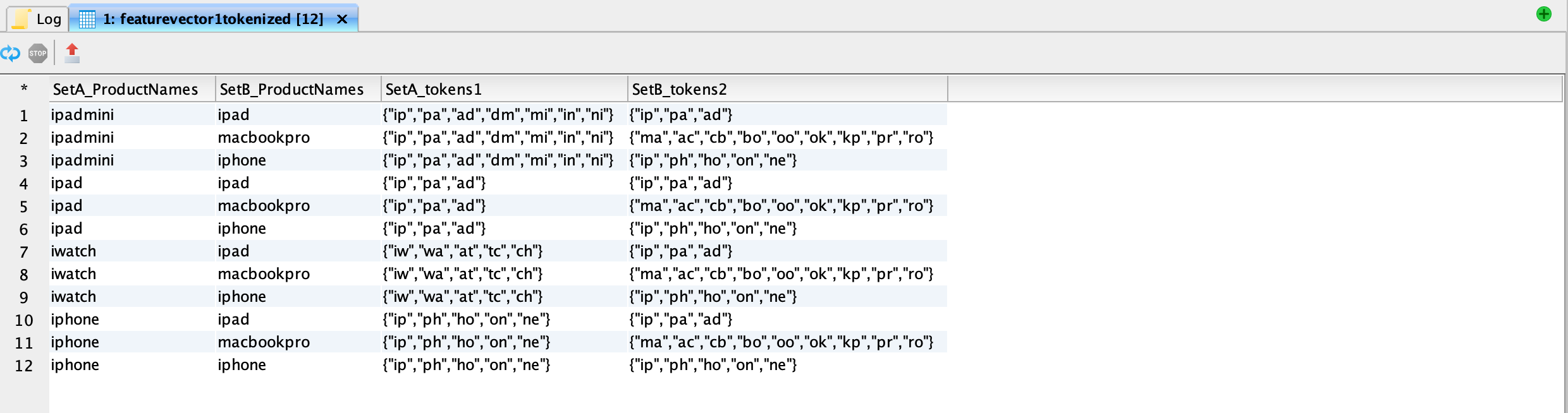
3. The `CROSS JOIN` operation combines all possible combinations of rows from the two datasets. In other words, it pairs each product name and its associated tokens from the first table (`A`) with each product name and its associated tokens from the second table(`B`). This results in a Cartesian product of the two datasets, where each row in the output represents a combination of a product name and its associated tokens from both datasets.

The results are:

<figure><img src="https://1899859430-files.gitbook.io/~/files/v0/b/gitbook-x-prod.appspot.com/o/spaces%2FEhcgqFIfGdE0GXJzi5yR%2Fuploads%2Fa6hEPJZoTIFhSf97Ny46%2FScreen%20Shot%202023-09-15%20at%2012.08.31%20AM.png?alt=media&#x26;token=78511503-fad7-435b-a4fb-e9ab71358933" alt=""><figcaption><p>Cross join with the tokens</p></figcaption></figure>

## Compute the Jaccard Similarity Measure

Computing the similarity measure should be very straightforward:

{% code overflow="wrap" %}

```sql
SELECT 
    SetA_ProductNames, 
    SetB_ProductNames, 
    SetA_tokens1,
    SetB_tokens2,
    size(array_intersect(SetA_tokens1, SetB_tokens2)) AS token_intersect_count,
    size(array_union(SetA_tokens1, SetB_tokens2)) AS token_union_count,
    ROUND(
        CAST(size(array_intersect(SetA_tokens1, SetB_tokens2)) AS DOUBLE) /    size(array_union(SetA_tokens1, SetB_tokens2)), 2) AS jaccard_similarity
FROM
    (SELECT
        A.featurevector1_distinct AS SetA_ProductNames,
        B.featurevector2_distinct AS SetB_ProductNames,
        A.tokens AS SetA_tokens1,
        B.tokens AS SetB_tokens2
    FROM
        featurevector1tokenized A
    CROSS JOIN
        featurevector2tokenized B
    );

```

{% endcode %}

Let us understand the code:

1. `size(array_intersect(SetA_tokens1, SetB_tokens2)) AS token_intersect_count`: This part calculates the number of tokens that are common to both `SetA_tokens1` and `SetB_tokens2`. It does so by computing the size of the intersection of the two arrays of tokens.
2. `size(array_union(SetA_tokens1, SetB_tokens2)) AS token_union_count`: This part calculates the total number of unique tokens across both `SetA_tokens1` and `SetB_tokens2`. It computes the size of the union of the two arrays of tokens.
3. `ROUND(CAST(size(array_intersect(SetA_tokens1, SetB_tokens2)) AS DOUBLE) / size(array_union(SetA_tokens1, SetB_tokens2)), 2) AS jaccard_similarity`: This part calculates the Jaccard similarity between the token sets. It divides the size of the token intersection by the size of the token union and rounds the result to two decimal places. The Jaccard similarity is a measure of how similar two sets are, with a value between 0 and 1, where 1 indicates complete similarity.

The results are:

<figure><img src="https://1899859430-files.gitbook.io/~/files/v0/b/gitbook-x-prod.appspot.com/o/spaces%2FEhcgqFIfGdE0GXJzi5yR%2Fuploads%2FUkaKoGW8OmszjY1jZGaX%2FScreen%20Shot%202023-09-15%20at%2012.11.52%20AM.png?alt=media&#x26;token=f3a67604-b429-4c58-a6b2-e8de498d9fe0" alt=""><figcaption><p>Jacard Similarity Measure across two feature vectors</p></figcaption></figure>

## Thresholding on Jaccard Similarity Measure

Let us use a threshold of 0.4 to filter out the columns that made it to our similarity join:

{% code overflow="wrap" %}

```sql
SELECT 
    SetA_ProductNames, 
    SetB_ProductNames
FROM 
(SELECT 
    SetA_ProductNames, 
    SetB_ProductNames, 
    SetA_tokens1,
    SetB_tokens2,
    size(array_intersect(SetA_tokens1, SetB_tokens2)) AS token_intersect_count,
    size(array_union(SetA_tokens1, SetB_tokens2)) AS token_union_count,
    ROUND(
        CAST(size(array_intersect(SetA_tokens1, SetB_tokens2)) AS DOUBLE) / size(array_union(SetA_tokens1, SetB_tokens2)),
        2
    ) AS jaccard_similarity
FROM
    (SELECT
        A.featurevector1_distinct AS SetA_ProductNames,
        B.featurevector2_distinct AS SetB_ProductNames,
        A.tokens AS SetA_tokens1,
        B.tokens AS SetB_tokens2
    FROM
        featurevector1tokenized A
    CROSS JOIN
        featurevector2tokenized B
    )
)
WHERE jaccard_similarity>=0.4
```

{% endcode %}

This gives the columns for the similarity join:

<figure><img src="https://1899859430-files.gitbook.io/~/files/v0/b/gitbook-x-prod.appspot.com/o/spaces%2FEhcgqFIfGdE0GXJzi5yR%2Fuploads%2FaSVk3Y0SuZRVtOXgScWV%2FScreen%20Shot%202023-09-15%20at%2012.22.27%20AM.png?alt=media&#x26;token=e1c2c61f-592a-48e9-8a25-f00b2bb45235" alt=""><figcaption><p>Similarity join between featurevector1 and featurevector2.</p></figcaption></figure>