# DDA 300: Audience Overlaps with Data Distiller

## Getting Started

Every day, a snapshot of the Profile attributes for every merge policy is exported to the data lake. These system datasets are hidden by default but are accessible by toggling these datasets in the data catalog.&#x20;

These datasets contain information about the profile attributes, the identity map, and the segment membership as reflected at the time of creating the snapshot. The examples below show how you can explore this dataset to understand identity composition and even create exotic segment overlaps.

To first access, the Profile Snapshot datasets, navigate to Datasets and click on the filter to show system datasets. Turning this filter on will show system datasets along with others. You need to search for "profile attribute" to filter down the list. Profile attribute snapshot datasets are exported for every merge policy in the system. In the example below, there are 3 merge policies and hence there are 3 datasets.&#x20;

These datasets will typically look like the following unless their name has been changed: `profile_attribute_cd03f195_66b5_4a62_a6f9_c606e951c903`

<figure><img src="https://1899859430-files.gitbook.io/~/files/v0/b/gitbook-x-prod.appspot.com/o/spaces%2FEhcgqFIfGdE0GXJzi5yR%2Fuploads%2FkhmKyc8bqS5ljmor816p%2Fimage.png?alt=media&#x26;token=407d86ee-15b3-4788-9a01-5f22a5903f81" alt=""><figcaption></figcaption></figure>

Even if the name has been changed, you should be able to query the dataset:

```sql
SELECT * FROM profile_attribute_cd03f195_66b5_4a62_a6f9_c606e951c903;
```

The columns you will see in the result will look like the following. If you see *identityMap* and *segmentMembership* fields, then you are on the right track.

<figure><img src="https://1899859430-files.gitbook.io/~/files/v0/b/gitbook-x-prod.appspot.com/o/spaces%2FEhcgqFIfGdE0GXJzi5yR%2Fuploads%2F7zsqSxM2w0WomllA8V0a%2FScreen%20Shot%202023-06-22%20at%202.22.12%20PM.png?alt=media&#x26;token=87790094-b1bb-422e-8c4b-67d8ddcc455b" alt=""><figcaption><p>Scrolling to right, you will see <em>identityMap</em> field and then the <em>segmentMembership</em>.</p></figcaption></figure>

There are some other interesting datasets that are generated on a daily basis by the system. Explore some of these on your own.&#x20;

```sql
select * from br_segment_destination;
```

<figure><img src="https://1899859430-files.gitbook.io/~/files/v0/b/gitbook-x-prod.appspot.com/o/spaces%2FEhcgqFIfGdE0GXJzi5yR%2Fuploads%2FazoUbi0xrootZ1ZDxgVS%2FScreen%20Shot%202023-06-26%20at%209.24.56%20AM.png?alt=media&#x26;token=423ad64f-1bcc-4a4b-b269-4da05bcbb7c2" alt=""><figcaption><p>Destination to segment napping</p></figcaption></figure>

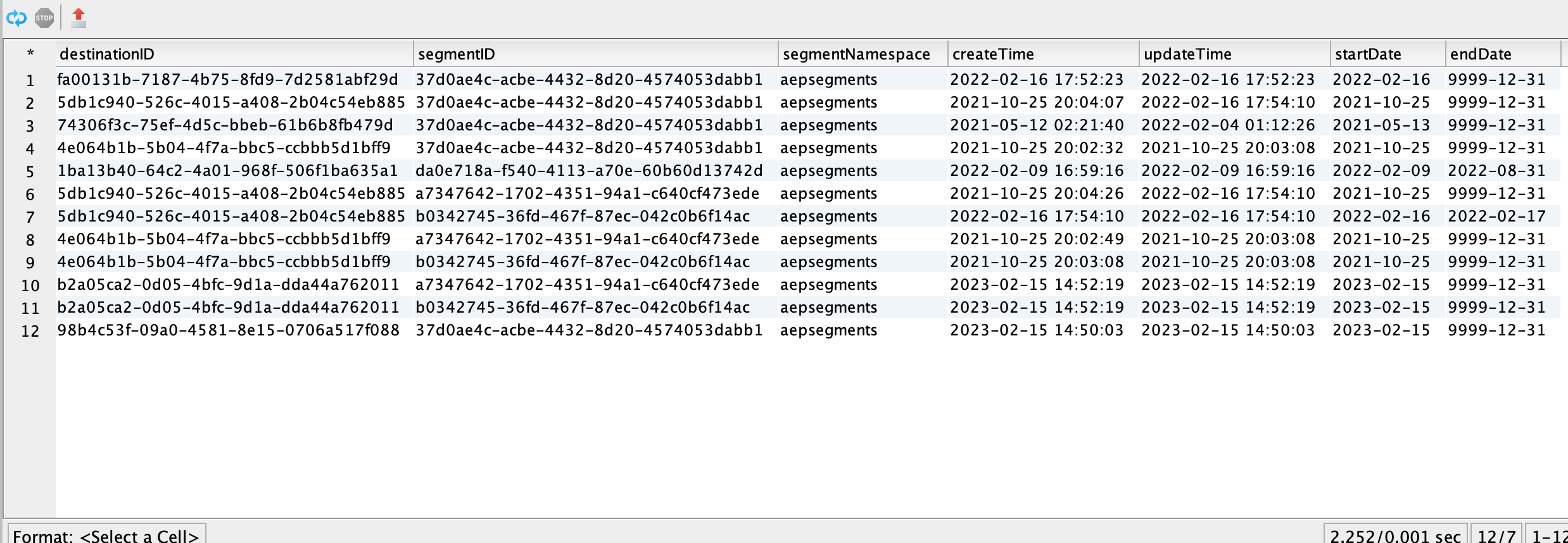
This will give you the list of destinations that have been mapped to a segment. Note that each row contains one such mapping and that a single destination can have multiple segments and vice versa. Also, note that *segmentnamespace* refers to the source of the segment i.e. whether it was created in AEP or elsewhere.

You may also see a dataset that contains the segment information. Search for a dataset that has segment definition in the schema type and you should be able to locate this dataset

```sql
select * from profile_segment_definition_6591ba8f_1422_499d_822a_543b2f7613a3
```

The results of the query look like the following:

<figure><img src="https://1899859430-files.gitbook.io/~/files/v0/b/gitbook-x-prod.appspot.com/o/spaces%2FEhcgqFIfGdE0GXJzi5yR%2Fuploads%2FlOcZqvX4RxSzazwiBQgR%2FScreen%20Shot%202023-06-26%20at%209.25.47%20AM.png?alt=media&#x26;token=4d8554a0-eb7e-4708-b298-605754a7ebb2" alt=""><figcaption><p>Segment ID to segment mapping raw table.</p></figcaption></figure>

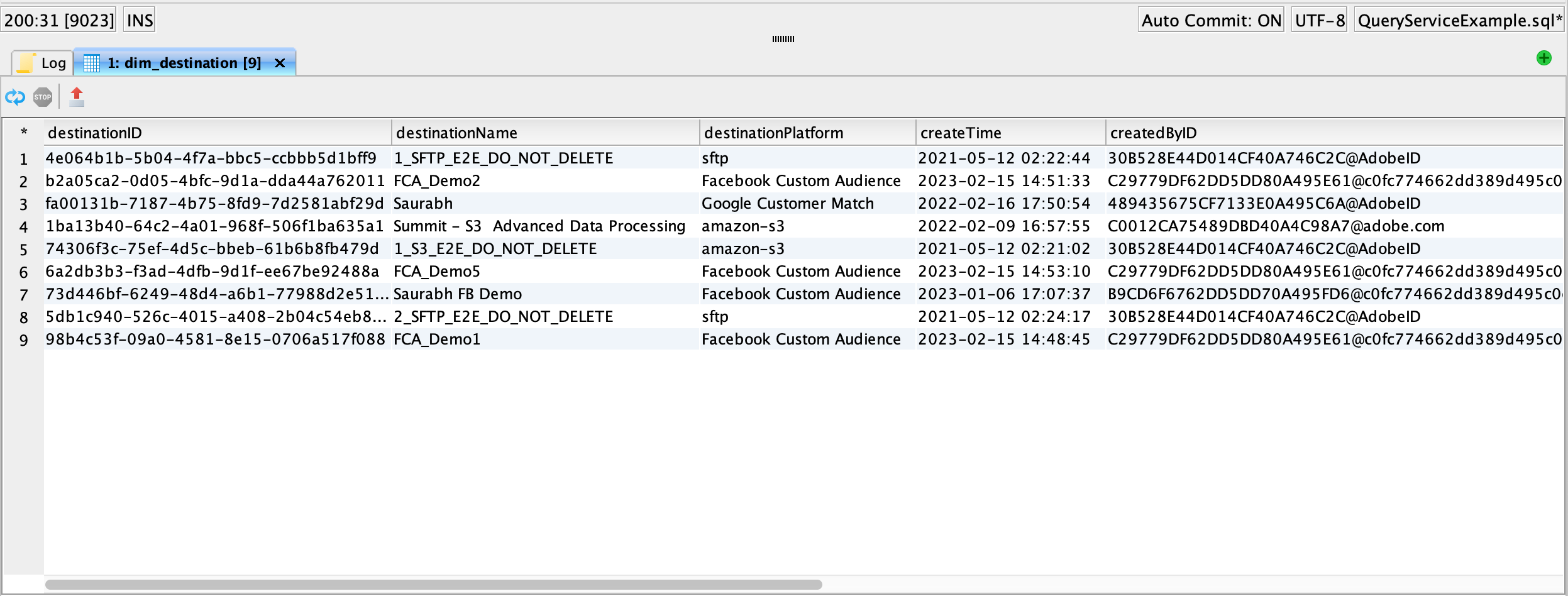
And finally the destinations ID to account name mapping is available in this system dataset:

```sql
select * from dim_destination;
```

<figure><img src="https://1899859430-files.gitbook.io/~/files/v0/b/gitbook-x-prod.appspot.com/o/spaces%2FEhcgqFIfGdE0GXJzi5yR%2Fuploads%2FL40QDfHrlBUbequ5OBqU%2FScreen%20Shot%202023-06-26%20at%209.24.35%20AM.png?alt=media&#x26;token=c21ca615-207c-493e-b038-accafc302330" alt=""><figcaption><p>Destination ID to Destination Account Name mapping</p></figcaption></figure>

Let us explore another dataset that gives us information about what identities are available for mapping to a destination.

```sql
select * from br_namespace_destination
order by destinationID
```

The result is:

<figure><img src="https://1899859430-files.gitbook.io/~/files/v0/b/gitbook-x-prod.appspot.com/o/spaces%2FEhcgqFIfGdE0GXJzi5yR%2Fuploads%2FWc13eavu4gS2A3x65V7x%2FScreen%20Shot%202023-06-26%20at%207.53.00%20PM.png?alt=media&#x26;token=fea25c9c-d645-428f-980f-68b06a1c8de7" alt=""><figcaption><p>Source identity namespaces that could map to the destination identity namespace. </p></figcaption></figure>

The result shows that for a given target identity (namespace) available in the destination, there are multiple source identity options, many of which are not used (*isMapped = false*). These identities were sourced by the profiles that were part of the audience which in turn was powered by the identity graph.

{% hint style="info" %}
**Tip:** Note that if an identity is missing at the source which is mapped to a destination field, that identity is dropped from being sent. There are other identities of the same profile that may have non-zero values and they will get sent to the destination. Activation to a destination is essentially a process of identity disaggregation.
{% endhint %}

{% hint style="warning" %}
**Warning:** The Profile attribute export dataset does not contain profiles that have more than 50 identities. In order to avoid losing these profiles, you need to contact Adobe to configure the identity graph so that it retains the most recent identities belonging to a cookie namespace.
{% endhint %}

Just for fun, let us see what fields are being used in our destinations in my test environment:

```sql
select * from br_namespace_destination
where isMapped='true'
order by destinationID
```

The results are:

<figure><img src="https://1899859430-files.gitbook.io/~/files/v0/b/gitbook-x-prod.appspot.com/o/spaces%2FEhcgqFIfGdE0GXJzi5yR%2Fuploads%2FhEEBjcicIcaWFrDvwvs3%2FScreen%20Shot%202023-06-26%20at%208.02.22%20PM.png?alt=media&#x26;token=0f00b3aa-9ea6-4837-aeb4-c2d6f0d4dbd0" alt=""><figcaption><p>Deestination identity fields being used in my environment.</p></figcaption></figure>

## Find Merge Policies in the Snapshot

The following tables are created from the Profile Attribute Snapshot in the reporting star schema for the Real-Time Customer Profiles. We will write queries against these tables to get answers that will be&#x20;

{% code fullWidth="false" %}

```sql
SELECT * FROM adwh_dim_merge_policies;
```

{% endcode %}

<figure><img src="https://1899859430-files.gitbook.io/~/files/v0/b/gitbook-x-prod.appspot.com/o/spaces%2FEhcgqFIfGdE0GXJzi5yR%2Fuploads%2FxoIIRpnWobvSXHzIPhn8%2FScreen%20Shot%202023-06-22%20at%202.36.03%20PM.png?alt=media&#x26;token=5ee53592-0359-41db-9500-2808938e9697" alt=""><figcaption></figcaption></figure>

{% hint style="info" %}
Note that there is no table name to merge policy mapping in this star schema. You need to run the first query to determine the merge policy and identify the *dataset\_id*. Use that to search the dataset name in Univeral Search at the top and not local dataset search.
{% endhint %}

<figure><img src="https://1899859430-files.gitbook.io/~/files/v0/b/gitbook-x-prod.appspot.com/o/spaces%2FEhcgqFIfGdE0GXJzi5yR%2Fuploads%2FWpgaYdLBrsUb7dFMvRAn%2FScreen%20Shot%202023-06-22%20at%202.43.07%20PM.png?alt=media&#x26;token=318efb80-441a-48cd-822b-146e9a2bb5c1" alt=""><figcaption><p>Copy the <em>dataset_id</em> from the query result</p></figcaption></figure>

You can get the *dataset\_id* to the *dataset name* by typing the following and browsing down the list of results:

```sql
SHOW TABLES
```

<figure><img src="https://1899859430-files.gitbook.io/~/files/v0/b/gitbook-x-prod.appspot.com/o/spaces%2FEhcgqFIfGdE0GXJzi5yR%2Fuploads%2FgBmrYPaBO3J4JOzLSwjg%2FScreen%20Shot%202023-06-23%20at%2011.01.29%20AM.png?alt=media&#x26;token=b9f78cc1-582d-41b5-80a7-655fde06baef" alt=""><figcaption><p>Query result</p></figcaption></figure>

Another approach would be to copy and paste that into the search bar at the top in the AEP UI.

<figure><img src="https://1899859430-files.gitbook.io/~/files/v0/b/gitbook-x-prod.appspot.com/o/spaces%2FEhcgqFIfGdE0GXJzi5yR%2Fuploads%2F4Gt3NoBYH3cehX3WkEKI%2FScreen%20Shot%202023-06-22%20at%202.43.14%20PM.png?alt=media&#x26;token=8fbb6e91-b284-4e16-a02a-ac90862d7a99" alt=""><figcaption><p>Dataset name is available for dataset id typed into Univeersal search</p></figcaption></figure>

The dataset name will reveal itself. Click on the dataset to get the table name which you will need as the table name for all your queries.

<figure><img src="https://1899859430-files.gitbook.io/~/files/v0/b/gitbook-x-prod.appspot.com/o/spaces%2FEhcgqFIfGdE0GXJzi5yR%2Fuploads%2FAL5URhDeJ5UH07d7cDkk%2Fimage.png?alt=media&#x26;token=98e56e3b-ad2e-49a3-ab99-a3a5ec9a9c89" alt=""><figcaption></figcaption></figure>

You should be able to start exploring the profile snapshot datasets immediately.&#x20;

{% code overflow="wrap" %}

```sql
SELECT * FROM profile_attribute_cd03f195_66b5_4a62_a6f9_c606e951c903;
```

{% endcode %}

<figure><img src="https://1899859430-files.gitbook.io/~/files/v0/b/gitbook-x-prod.appspot.com/o/spaces%2FEhcgqFIfGdE0GXJzi5yR%2Fuploads%2FYOx55PIiiUnFhSrrzZ10%2FScreen%20Shot%202023-06-22%20at%202.53.28%20PM.png?alt=media&#x26;token=ae4d0295-552d-4236-b9aa-4e8c53c58282" alt=""><figcaption><p>Query result</p></figcaption></figure>

{% code overflow="wrap" %}

```sql
SELECT person.name.lastName FROM profile_attribute_cd03f195_66b5_4a62_a6f9_c606e951c903
```

{% endcode %}

<figure><img src="https://1899859430-files.gitbook.io/~/files/v0/b/gitbook-x-prod.appspot.com/o/spaces%2FEhcgqFIfGdE0GXJzi5yR%2Fuploads%2FCLOfj7AGEn3J0haUk9S0%2FScreen%20Shot%202023-06-22%20at%202.51.06%20PM.png?alt=media&#x26;token=dc052a83-a910-45f1-a359-4f033f3aabaa" alt=""><figcaption><p>Query result</p></figcaption></figure>

## **Retrieve Segment Information**

```sql
SELECT * FROM adwh_dim_segments;
```

<figure><img src="https://1899859430-files.gitbook.io/~/files/v0/b/gitbook-x-prod.appspot.com/o/spaces%2FEhcgqFIfGdE0GXJzi5yR%2Fuploads%2F2mmSwaJBFk5iE8sdDsZp%2FScreen%20Shot%202023-06-22%20at%202.39.08%20PM.png?alt=media&#x26;token=004f0a68-f949-40df-9946-aef745790116" alt=""><figcaption><p>Query result</p></figcaption></figure>

## **Count Profiles by Merge Policy**

Merge policy is an "MDM-like" feature that lets you prioritize attribute records whenever there is a conflict i.e. either use one dataset over the other or use the timestamp to resolve that conflict. Mostly, you will see that timestamp precedence is used as the source of truth is typically a CRM system that is evolving over time, and new attribute records with updates get added to the Real-Time Customer Profile. The new records need to take precedence.

{% code overflow="wrap" %}

```sql
SELECT COUNT(identityMap) FROM profile_attribute_cd03f195_66b5_4a62_a6f9_c606e951c903;
```

{% endcode %}

<figure><img src="https://1899859430-files.gitbook.io/~/files/v0/b/gitbook-x-prod.appspot.com/o/spaces%2FEhcgqFIfGdE0GXJzi5yR%2Fuploads%2FzsoN6zi1mHxfKvA3cIWu%2FScreen%20Shot%202023-06-22%20at%202.59.50%20PM.png?alt=media&#x26;token=28335437-729d-4d61-80ba-091f20144961" alt=""><figcaption><p>Query result</p></figcaption></figure>

If you navigate to the Profiles->Overview page, for the same merge policy, you will see the same count. Note that we had chosen ***Default Time-based*** merge policy in this example in our environment.

<figure><img src="https://1899859430-files.gitbook.io/~/files/v0/b/gitbook-x-prod.appspot.com/o/spaces%2FEhcgqFIfGdE0GXJzi5yR%2Fuploads%2FooV4SYxGvSjemnW3Ur4s%2FScreen%20Shot%202023-06-22%20at%203.22.55%20PM.png?alt=media&#x26;token=79ee6ebf-e34f-4875-8cee-9c4aad184061" alt=""><figcaption><p>Profiles Overview page has merge policy filter that gives you the same count.</p></figcaption></figure>

## **Use EXPLODE to Separate Identities in Separate Rows**

{% code overflow="wrap" %}

```sql
SELECT Segmentmembership, explode(identitymap) from profile_attribute_cd03f195_66b5_4a62_a6f9_c606e951c903;
```

{% endcode %}

<figure><img src="https://1899859430-files.gitbook.io/~/files/v0/b/gitbook-x-prod.appspot.com/o/spaces%2FEhcgqFIfGdE0GXJzi5yR%2Fuploads%2FZkfPXgFXqKaXttQt8ds2%2FScreen%20Shot%202023-06-22%20at%203.29.24%20PM.png?alt=media&#x26;token=a15921b4-6269-4027-a93b-d041f2ff9801" alt=""><figcaption><p>Query result</p></figcaption></figure>

{% hint style="warning" %}
This splitting into rows destroys Identity map association.
{% endhint %}

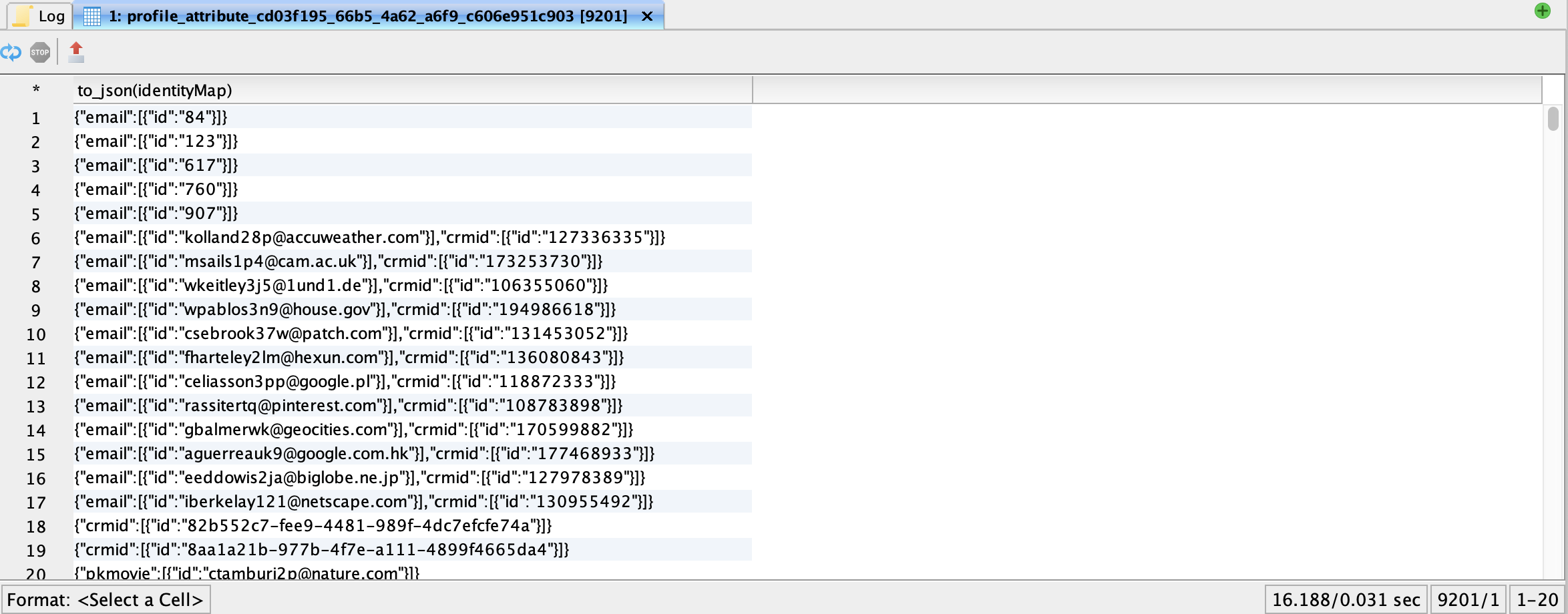
Before you extract the identity information, you need to understand the map structure. Use the to\_json feature in Data Distiller to get in place information about the schema structure without having to go to the Schemas UI screen. This is an extremely important feature with deeply nested data structures and maps.&#x20;

{% code overflow="wrap" %}

```sql
SELECT to_json(identityMap) FROM profile_attribute_cd03f195_66b5_4a62_a6f9_c606e951c903;
```

{% endcode %}

If you execute the following, you will see the following:

<figure><img src="https://1899859430-files.gitbook.io/~/files/v0/b/gitbook-x-prod.appspot.com/o/spaces%2FEhcgqFIfGdE0GXJzi5yR%2Fuploads%2FBZTmanH1RLmpMqkg3API%2FScreen%20Shot%202023-08-02%20at%202.54.10%20PM.png?alt=media&#x26;token=b848e8d4-c350-4d89-be86-aa04ba0f59cd" alt=""><figcaption><p>Identity maps structure</p></figcaption></figure>

What you see above is the identity map structure. The map has the identity namespace (email, crmid) as the unique key to index the values. Note that this is an array of values. If you need to extract the identities, you will need to use the following code:

{% code overflow="wrap" %}

```sql
SELECT identityMap.email.id FROM profile_attribute_cd03f195_66b5_4a62_a6f9_c606e951c903;
```

{% endcode %}

The results look like the following:

<figure><img src="https://1899859430-files.gitbook.io/~/files/v0/b/gitbook-x-prod.appspot.com/o/spaces%2FEhcgqFIfGdE0GXJzi5yR%2Fuploads%2Fv1OZKOpuVED3kQxb8x8z%2FScreen%20Shot%202023-08-02%20at%202.58.30%20PM.png?alt=media&#x26;token=3231131a-1b5f-4098-b65d-66ab8ab473ce" alt=""><figcaption><p>Array of identity values</p></figcaption></figure>

Typically we would explode this array

{% code overflow="wrap" %}

```sql
SELECT explode(identityMap.email.id) FROM profile_attribute_cd03f195_66b5_4a62_a6f9_c606e951c903;
```

{% endcode %}

<figure><img src="https://1899859430-files.gitbook.io/~/files/v0/b/gitbook-x-prod.appspot.com/o/spaces%2FEhcgqFIfGdE0GXJzi5yR%2Fuploads%2FbSKQ4LSHukbf7s5dStng%2FScreen%20Shot%202023-08-02%20at%203.01.49%20PM.png?alt=media&#x26;token=5c35769a-d6c8-4e00-ba2d-ce6d84392891" alt=""><figcaption><p>Exploding the array helps you extract the identities.</p></figcaption></figure>

But there is a problem - plain vanilla "explode" will get rid of rows that do not have any identity values. That is a problem because the absence of an identity is a signal and is possibly associated with other identities that the person may have. Let us fix the issue by using *explode\_outer* from Data Distiller:

{% code overflow="wrap" %}

```sql
SELECT explode_outer(identityMap.email.id) AS email  FROM profile_attribute_cd03f195_66b5_4a62_a6f9_c606e951c903
```

{% endcode %}

<div data-full-width="false"><figure><img src="https://1899859430-files.gitbook.io/~/files/v0/b/gitbook-x-prod.appspot.com/o/spaces%2FEhcgqFIfGdE0GXJzi5yR%2Fuploads%2FFcnnrAfBdDC5KiUgvNw6%2FScreen%20Shot%202023-08-02%20at%203.35.11%20PM.png?alt=media&#x26;token=4b49ca41-d864-4199-bd68-73f86f56e108" alt=""><figcaption><p>explode_outer retains the nulls for the identity namespaces</p></figcaption></figure></div>

But just doing an *explode\_outer* on a single identity namespace is of no use. We have destroyed the association between identities within that same namespace. Let us generate a synthetic UUID for each profile row to keep track of our identities as we explode them. If we do this right, we will generate a table of UUIDs and related identities as a columnar table that gives us leverage to use it for a variety of operations.&#x20;

If we take the first element of the email namespace and concatenate that with the first element of the crmid namespace, we are guaranteed a unique identifier. If not, it would mean that two rows in the profile export dataset have that identity in common. The identity stitching in Real-Time Customer Profile should have taken care of it and merged it into a single row.&#x20;

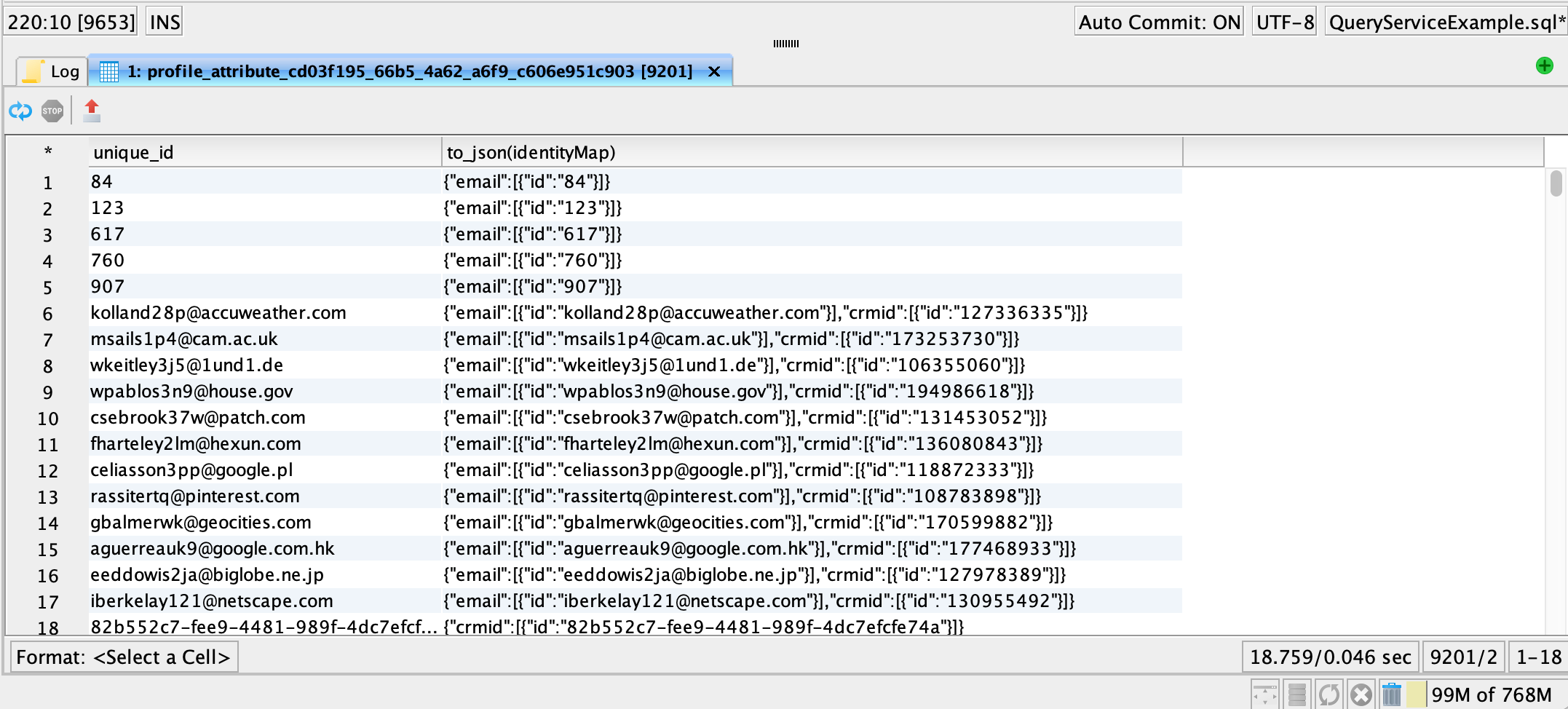
Let us now generate the unique UUIDs along with the schema-friendly identity map structure

{% code overflow="wrap" %}

```sql
SELECT concat(identityMap.email.id[0],identityMap.crmid.id[0]) AS unique_id,to_json(identityMap) from profile_attribute_cd03f195_66b5_4a62_a6f9_c606e951c903
```

{% endcode %}

The results will look like:

<figure><img src="https://1899859430-files.gitbook.io/~/files/v0/b/gitbook-x-prod.appspot.com/o/spaces%2FEhcgqFIfGdE0GXJzi5yR%2Fuploads%2FTSoaqdb6Ah8Yj1wwvPEk%2FScreen%20Shot%202023-08-02%20at%204.45.26%20PM.png?alt=media&#x26;token=006f1a4a-8359-4609-98d4-43594f873d25" alt=""><figcaption><p>Generate the unique ID without llosing identity associations.</p></figcaption></figure>

But *concat* string function does a poor job at concatenating NULL values. We have to remedy that with COALESCE:

{% code overflow="wrap" %}

```sql
SELECT COALESCE(identityMap.email.id[0],identityMap.crmid.id[0]) as unique_id,to_json(identityMap) from profile_attribute_cd03f195_66b5_4a62_a6f9_c606e951c903
```

{% endcode %}

This works and you will get:

<figure><img src="https://1899859430-files.gitbook.io/~/files/v0/b/gitbook-x-prod.appspot.com/o/spaces%2FEhcgqFIfGdE0GXJzi5yR%2Fuploads%2F31C9bFnSnanJKBUruoab%2FScreen%20Shot%202023-08-02%20at%205.43.41%20PM.png?alt=media&#x26;token=8b91a45c-8c13-4641-b72b-37b819f3f964" alt=""><figcaption><p>COALESCE function retrieves the first non-zero value in a list and is a good choice for a unique ID for the profile in our example.</p></figcaption></figure>

If there are two identity namespaces, then the *explode\_outer* operator works on each, one at a time. Make sure you remove the *to\_json* as we do not need it anymore:

{% code overflow="wrap" %}

```sql
SELECT unique_id, explode_outer(identityMap.email.id) AS email, identityMap.crmid.id AS crmid FROM
(SELECT coalesce(identityMap.email.id[0],identityMap.crmid.id[0]) AS unique_id,identityMap from profile_attribute_cd03f195_66b5_4a62_a6f9_c606e951c903)
```

{% endcode %}

You will get:&#x20;

<figure><img src="https://1899859430-files.gitbook.io/~/files/v0/b/gitbook-x-prod.appspot.com/o/spaces%2FEhcgqFIfGdE0GXJzi5yR%2Fuploads%2FBuUGe9lINqOhxnSEHmC1%2FScreen%20Shot%202023-08-02%20at%205.50.28%20PM.png?alt=media&#x26;token=8fea26fb-3780-47fc-b7a7-ea5459925286" alt=""><figcaption><p><em>email</em> identities have been separated into separate rows without breaking profile association.</p></figcaption></figure>

We need to explode this one more time for *crmid* and we should get:

{% code overflow="wrap" %}

```sql
SELECT unique_id, email, explode_outer(crmid) as crmid FROM (
SELECT unique_id, explode_outer(identityMap.email.id) AS email, identityMap.crmid.id AS crmid FROM
(SELECT coalesce(identityMap.email.id[0],identityMap.crmid.id[0]) AS unique_id,identityMap from profile_attribute_cd03f195_66b5_4a62_a6f9_c606e951c903)
)
```

{% endcode %}

The results would be:

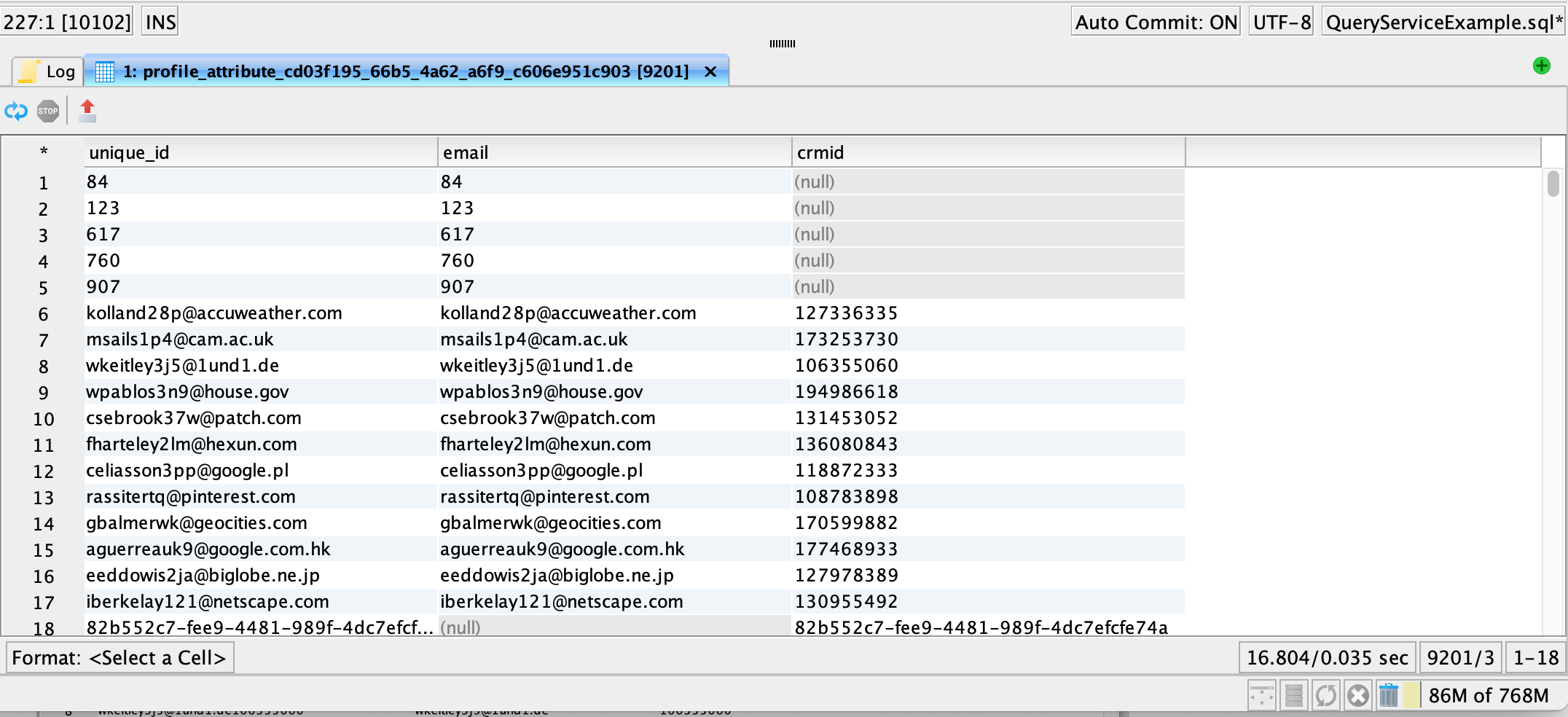
<figure><img src="https://1899859430-files.gitbook.io/~/files/v0/b/gitbook-x-prod.appspot.com/o/spaces%2FEhcgqFIfGdE0GXJzi5yR%2Fuploads%2FqAmU3Rg71BaukshNhP0R%2FScreen%20Shot%202023-08-02%20at%205.51.35%20PM.png?alt=media&#x26;token=8ee6ddda-ae7e-461a-a69f-964ba76b3730" alt=""><figcaption><p>Identity lookup table in relational form</p></figcaption></figure>

Using this table, I can do some very interesting analysis. For example, we can look at the histogram of email IDs in the system:

{% code overflow="wrap" %}

```sql
SELECT bucket, count(unique_id) FROM(
SELECT unique_id, count(CASE WHEN email IS NULL THEN 0 ELSE email END) as bucket FROM(
SELECT unique_id, email, explode_outer(crmid) as crmid FROM (
SELECT unique_id, explode_outer(identityMap.email.id) AS email, identityMap.crmid.id AS crmid FROM
(SELECT coalesce(identityMap.email.id[0],identityMap.crmid.id[0]) AS unique_id,identityMap from profile_attribute_cd03f195_66b5_4a62_a6f9_c606e951c903)
))
GROUP BY unique_id 
ORDER BY bucket ASC)
GROUP BY bucket
```

{% endcode %}

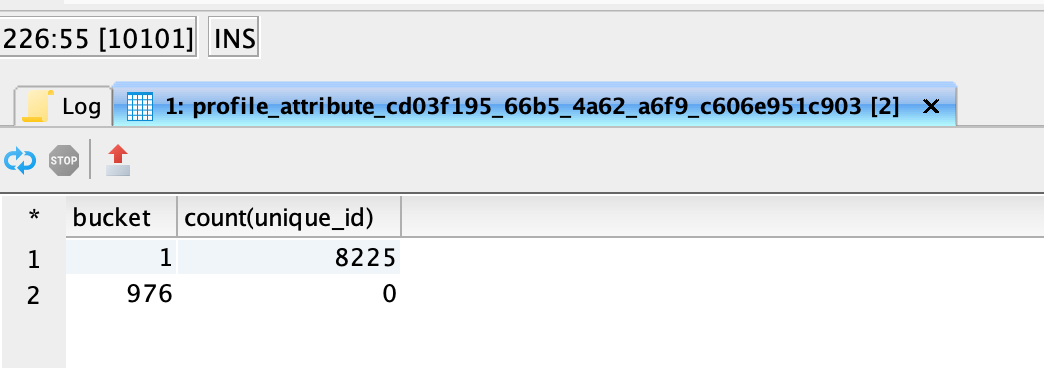
The answer looks like this:

<figure><img src="https://1899859430-files.gitbook.io/~/files/v0/b/gitbook-x-prod.appspot.com/o/spaces%2FEhcgqFIfGdE0GXJzi5yR%2Fuploads%2FGP0TYnsEQvntnY2FhxAd%2FScreen%20Shot%202023-08-02%20at%206.25.16%20PM.png?alt=media&#x26;token=83d851d5-b565-4511-9d5d-c1fc8b972a9c" alt=""><figcaption></figcaption></figure>

Why are we seeing 976 as a bucket and 0 counts for unique\_ids? The sum of 8225 and 976 adds up to the number of profiles. Why did we even get this result in the first place? Is there something wrong with the way the SQL is written or is there something more profound happening in the identity graph?&#x20;

Still cannot figure it out? What if the *email* and *crmid i*dentities were non-existent? You have null rows in the table that you should clean before you do any analytics. For the identity lookup use case which is the goal of this section, it would not matter,

## **Extract Identities Without Breaking Segment Membership  Association**

In our example, we will be simplifying the use case since we do not have multiple identities. We will be just using the first element to create a simple map.&#x20;

{% code overflow="wrap" %}

```sql
SELECT identitymap.email.id[0] AS email, identitymap.crmid.id[0] AS crmid from profile_attribute_cd03f195_66b5_4a62_a6f9_c606e951c903;
```

{% endcode %}

<figure><img src="https://1899859430-files.gitbook.io/~/files/v0/b/gitbook-x-prod.appspot.com/o/spaces%2FEhcgqFIfGdE0GXJzi5yR%2Fuploads%2FoXJ6H6svXJpbdmSFv7TA%2FScreen%20Shot%202023-06-22%20at%203.29.56%20PM.png?alt=media&#x26;token=2bf6b1de-87d4-48d5-b9e8-84c744276d66" alt=""><figcaption><p>Query result</p></figcaption></figure>

{% code overflow="wrap" %}

```sql
SELECT Segmentmembership, identitymap.email.id[0] AS email, identitymap.crmid.id[0] AS crmid
from profile_attribute_cd03f195_66b5_4a62_a6f9_c606e951c903;
```

{% endcode %}

<figure><img src="https://1899859430-files.gitbook.io/~/files/v0/b/gitbook-x-prod.appspot.com/o/spaces%2FEhcgqFIfGdE0GXJzi5yR%2Fuploads%2FMsHTGT9qtpVHxopA4xkt%2FScreen%20Shot%202023-06-22%20at%203.30.36%20PM.png?alt=media&#x26;token=45e7f9e2-f9d7-4e4f-8a1f-80f1cfd60738" alt=""><figcaption><p>Query result</p></figcaption></figure>

## Expand Segment Membership&#x20;

{% code overflow="wrap" %}

```sql
SELECT  explode(Segmentmembership), email, crmid  
       FROM 
         (SELECT Segmentmembership, identitymap.email.id[0] AS email, identitymap.crmid.id[0] AS crmid
            FROM profile_attribute_cd03f195_66b5_4a62_a6f9_c606e951c903)sq
```

{% endcode %}

<figure><img src="https://1899859430-files.gitbook.io/~/files/v0/b/gitbook-x-prod.appspot.com/o/spaces%2FEhcgqFIfGdE0GXJzi5yR%2Fuploads%2FpsXbBog3LwHmv8F2VXzs%2FScreen%20Shot%202023-06-22%20at%203.31.55%20PM.png?alt=media&#x26;token=15f95e90-c0ea-438e-9207-f08b279d967c" alt=""><figcaption><p>Query result</p></figcaption></figure>

## Create Segment Membership, Email, and CRMID Triples

{% code overflow="wrap" %}

```sql
SELECT key AS segment_id, email, crmid FROM (
SELECT explode(value), email, crmid   FROM ( 
    SELECT  explode(Segmentmembership), email, crmid  
       FROM 
         (SELECT Segmentmembership, identitymap.email.id[0] AS email,     identitymap.crmid.id[0] AS crmid
            from profile_attribute_cd03f195_66b5_4a62_a6f9_c606e951c903)
            )
            ); 
```

{% endcode %}

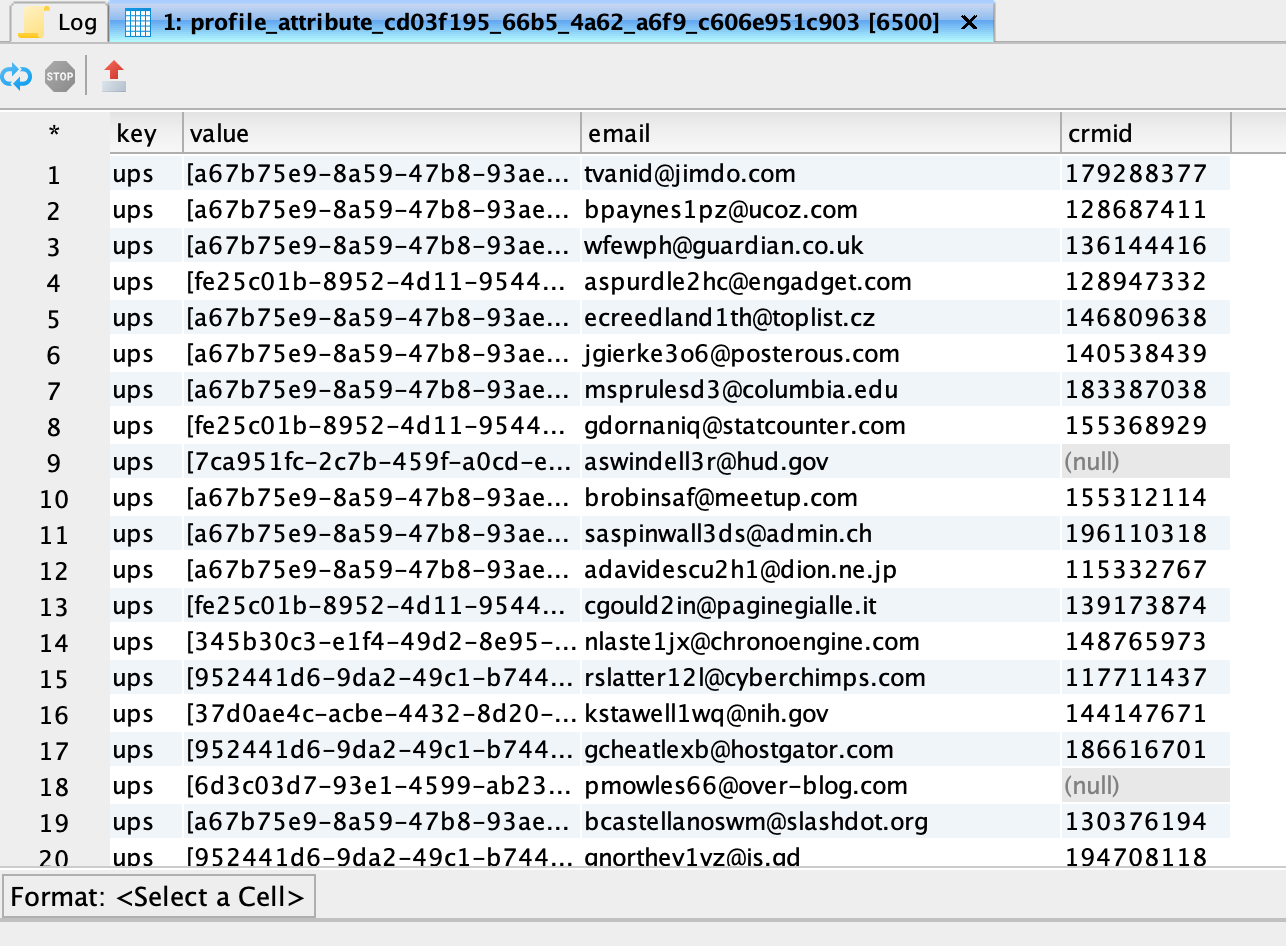
<figure><img src="https://1899859430-files.gitbook.io/~/files/v0/b/gitbook-x-prod.appspot.com/o/spaces%2FEhcgqFIfGdE0GXJzi5yR%2Fuploads%2FR9pJlDE0z3GRVeO2YSA6%2FScreen%20Shot%202023-06-22%20at%203.32.28%20PM.png?alt=media&#x26;token=79f6cfb4-25ca-4efc-ac66-5b7641701ab2" alt=""><figcaption><p>Query result.</p></figcaption></figure>

## **Resolve Segment ID to Segment Name**

The segment\_id needs to be resolved to a segment name. Note that I have to name the subqueries in order to reference them in the INNER JOIN clause. I am also creating a unique UID by concatenating the ID values

{% code overflow="wrap" %}

```sql
SELECT segment_name, email, crmid, concat(email, crmid) AS UID FROM 
(
SELECT key AS segment_id, email, crmid FROM (
SELECT explode(value), email, crmid   FROM ( 
    SELECT  explode(Segmentmembership), email, crmid  
       FROM 
         (SELECT Segmentmembership, identitymap.email.id[0] AS email, identitymap.crmid.id[0] AS crmid
            from profile_attribute_cd03f195_66b5_4a62_a6f9_c606e951c903)
            )
            ) ) AS A
INNER JOIN adwh_dim_segments AS B 
ON A.segment_id=B.segment;
```

{% endcode %}

<figure><img src="https://1899859430-files.gitbook.io/~/files/v0/b/gitbook-x-prod.appspot.com/o/spaces%2FEhcgqFIfGdE0GXJzi5yR%2Fuploads%2FUs0zoFuNTpP3b4EzBWxV%2FScreen%20Shot%202023-06-22%20at%203.33.01%20PM.png?alt=media&#x26;token=ad80c6a6-4226-4343-9b9d-0dacf5618970" alt=""><figcaption><p>Query result</p></figcaption></figure>

## **Write Query Result to Data Lake**

Materialize this table to the data lake. Use the DROP TABLE clause to wipe out an existing table

{% code overflow="wrap" %}

```sql
DROP TABLE  IF EXISTS segment_data;
CREATE TABLE segment_data AS (SELECT segment_name, email, crmid, concat(email, crmid) AS UID FROM 
(
SELECT key AS segment_id, email, crmid FROM (
SELECT explode(value), email, crmid   FROM ( 
    SELECT  explode(Segmentmembership), email, crmid  
       FROM 
         (SELECT Segmentmembership, identitymap.email.id[0] AS email, identitymap.crmid.id[0] AS crmid
            from profile_attribute_cd03f195_66b5_4a62_a6f9_c606e951c903)
            )
            ) ) AS A
INNER JOIN adwh_dim_segments AS B 
ON A.segment_id=B.segment);
```

{% endcode %}

<figure><img src="https://1899859430-files.gitbook.io/~/files/v0/b/gitbook-x-prod.appspot.com/o/spaces%2FEhcgqFIfGdE0GXJzi5yR%2Fuploads%2FSOuR0kJiAjrujxyTEVCi%2FScreen%20Shot%202023-06-22%20at%203.40.02%20PM.png?alt=media&#x26;token=de2cc348-04d9-467e-a73f-7d84a4baf3ef" alt=""><figcaption><p>Query result</p></figcaption></figure>

Explore what is contained in the dataset. We should see 13K rows

```sql
SELECT * FROM segment_data;
```

<figure><img src="https://1899859430-files.gitbook.io/~/files/v0/b/gitbook-x-prod.appspot.com/o/spaces%2FEhcgqFIfGdE0GXJzi5yR%2Fuploads%2FVRYR5fdj0wuVfnnUnfnZ%2FScreen%20Shot%202023-06-22%20at%203.40.23%20PM.png?alt=media&#x26;token=2f5be9b1-4baf-48b3-a204-3cfe2850e20a" alt=""><figcaption><p>Query result</p></figcaption></figure>

Identify records that have NULL crmid values

```sql
SELECT * FROM segment_data
WHERE crmid IS NULL;
```

<figure><img src="https://1899859430-files.gitbook.io/~/files/v0/b/gitbook-x-prod.appspot.com/o/spaces%2FEhcgqFIfGdE0GXJzi5yR%2Fuploads%2FH5UwygfOpZyXyR7UWgnl%2FScreen%20Shot%202023-06-22%20at%203.40.42%20PM.png?alt=media&#x26;token=b7c903f5-89d0-4a31-aeca-33174e7b830d" alt=""><figcaption><p>Query result</p></figcaption></figure>

## **Audience Size Calculation**

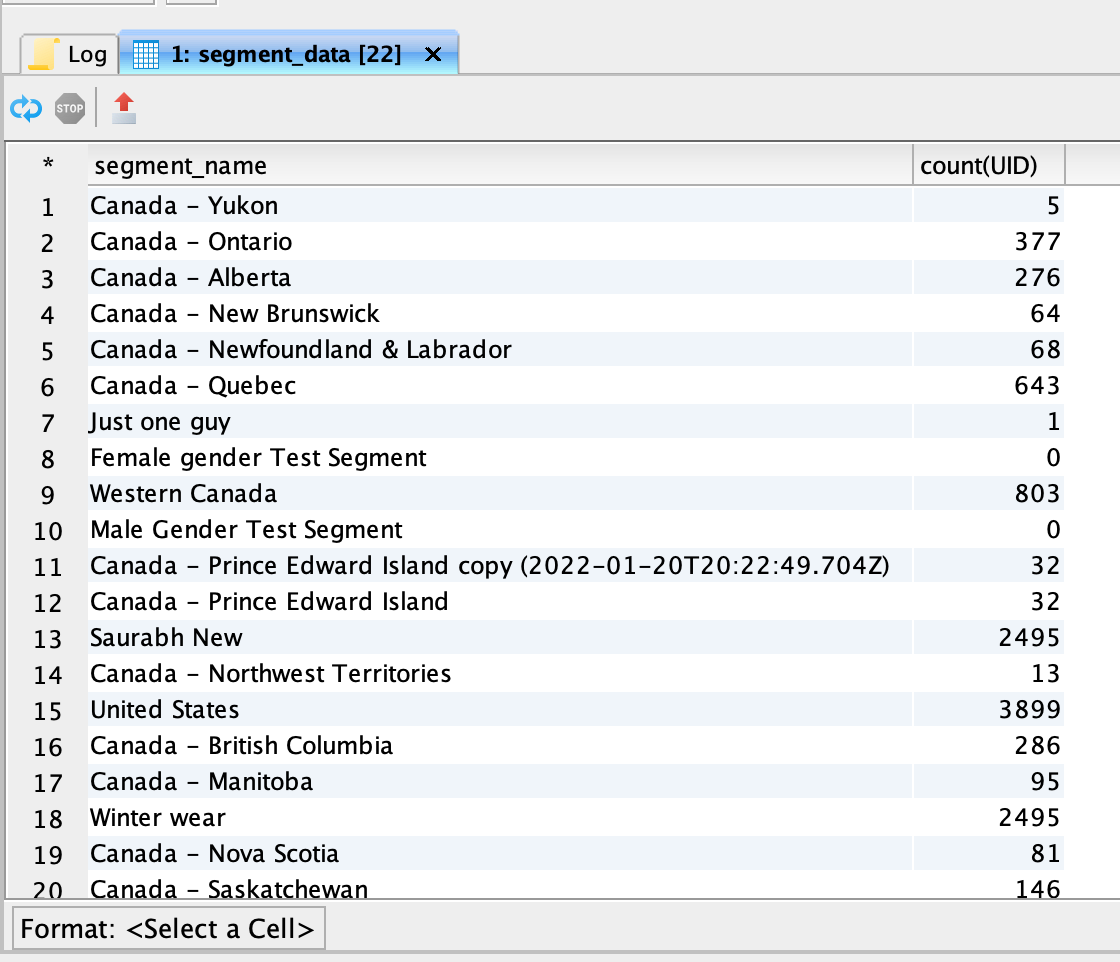
Here we will count the number of people vs what I see in the UI. There are some segments that are zero and that do not agree with UI. What do you think happened?

```sql
SELECT segment_name, count(UID)
FROM segment_data
GROUP BY segment_name
```

&#x20;

<figure><img src="https://1899859430-files.gitbook.io/~/files/v0/b/gitbook-x-prod.appspot.com/o/spaces%2FEhcgqFIfGdE0GXJzi5yR%2Fuploads%2FnZjwSnDVZS0exOcoeOdd%2FScreen%20Shot%202023-06-22%20at%203.41.01%20PM.png?alt=media&#x26;token=10ed1be7-26d1-46b8-8ba5-c937b7603046" alt=""><figcaption><p>Query result</p></figcaption></figure>

Do not materialize the dataset. Instead, let us fix this with COALESCE

{% code overflow="wrap" %}

```sql
SELECT segment_name, count(DISTINCT UID) FROM (SELECT segment_name, email, crmid, concat(COALESCE(email, ''), COALESCE(crmid, ''))AS UID FROM 
(
SELECT key AS segment_id, email, crmid FROM (
SELECT explode(value), email, crmid   FROM ( 
    SELECT  explode(Segmentmembership), email, crmid  
       FROM 
         (SELECT Segmentmembership, identitymap.email.id[0] AS email, identitymap.crmid.id[0] AS crmid
            from profile_attribute_cd03f195_66b5_4a62_a6f9_c606e951c903)
            )
            ) ) AS A
INNER JOIN adwh_dim_segments AS B 
ON A.segment_id=B.segment)
GROUP BY segment_name;
```

{% endcode %}

<figure><img src="https://1899859430-files.gitbook.io/~/files/v0/b/gitbook-x-prod.appspot.com/o/spaces%2FEhcgqFIfGdE0GXJzi5yR%2Fuploads%2FeZSZB4RDsaIejvSTz1iT%2FScreen%20Shot%202023-06-22%20at%203.41.59%20PM.png?alt=media&#x26;token=0dd52cad-bfe8-4994-8e64-a9c6d11533f9" alt=""><figcaption><p>Query result</p></figcaption></figure>

We still do not materialize because we need to check the count. It should be 8,225 in our case.

{% code overflow="wrap" %}

```sql
SELECT count(DISTINCT UID) FROM (SELECT segment_name, email, crmid, concat(COALESCE(email, ''), COALESCE(crmid, '')) AS UID FROM 
(
SELECT key AS segment_id, email, crmid FROM (
SELECT explode(value), email, crmid   FROM ( 
    SELECT  explode(Segmentmembership), email, crmid  
       FROM 
         (SELECT Segmentmembership, identitymap.email.id[0] AS email, identitymap.crmid.id[0] AS crmid
            from profile_attribute_cd03f195_66b5_4a62_a6f9_c606e951c903)
            )
            ) ) AS A
INNER JOIN adwh_dim_segments AS B 
ON A.segment_id=B.segment);
```

{% endcode %}

<figure><img src="https://1899859430-files.gitbook.io/~/files/v0/b/gitbook-x-prod.appspot.com/o/spaces%2FEhcgqFIfGdE0GXJzi5yR%2Fuploads%2FfvfA1qwjd3fQAGJJuKmP%2FScreen%20Shot%202023-06-22%20at%203.43.00%20PM.png?alt=media&#x26;token=2c88edf6-5752-45ba-99f4-aa71e9054612" alt=""><figcaption><p>Query result</p></figcaption></figure>

The above query result does not agree with what we see below. Where is the difference?

Exploding *segmentMembership* eliminated unsegmented profiles.

{% code overflow="wrap" %}

```sql
SELECT COUNT(identityMap) FROM profile_attribute_cd03f195_66b5_4a62_a6f9_c606e951c903;
```

{% endcode %}

<figure><img src="https://1899859430-files.gitbook.io/~/files/v0/b/gitbook-x-prod.appspot.com/o/spaces%2FEhcgqFIfGdE0GXJzi5yR%2Fuploads%2FLMG50BY3JmDF20CLeNjp%2FScreen%20Shot%202023-06-22%20at%203.43.20%20PM.png?alt=media&#x26;token=e679b90b-e854-4d32-83f4-660627b7b6fe" alt=""><figcaption></figcaption></figure>

{% code overflow="wrap" %}

```sql
SELECT COUNT(identityMap) FROM profile_attribute_cd03f195_66b5_4a62_a6f9_c606e951c WHERE Segmentmembership IS NULL903
```

{% endcode %}

<figure><img src="https://1899859430-files.gitbook.io/~/files/v0/b/gitbook-x-prod.appspot.com/o/spaces%2FEhcgqFIfGdE0GXJzi5yR%2Fuploads%2FgMvZea5lpoAqyRc90mNa%2FScreen%20Shot%202023-06-22%20at%203.43.39%20PM.png?alt=media&#x26;token=19a43e3d-99bf-4198-ae45-dc5cdb287077" alt=""><figcaption><p>Query result</p></figcaption></figure>

If you add 6500 (profiles attached to at least one segment)+1725 (profiles not attached to any segment), you get 8225 which is our count.

## **Generate Segment Name to Identities Table**

{% code overflow="wrap" %}

```sql
DROP TABLE  IF EXISTS segment_data;
CREATE TABLE segment_data AS (
SELECT segment_name, email, crmid, concat(COALESCE(email, ''), COALESCE(crmid, '')) AS UID FROM 
(
SELECT key AS segment_id, email, crmid FROM (
SELECT explode(value), email, crmid   FROM ( 
    SELECT  explode(Segmentmembership), email, crmid  
       FROM 
         (SELECT Segmentmembership, identitymap.email.id[0] AS email, identitymap.crmid.id[0] AS crmid
            from profile_attribute_cd03f195_66b5_4a62_a6f9_c606e951c903)
            )
            ) ) AS A
INNER JOIN adwh_dim_segments AS B 
ON A.segment_id=B.segment);
```

{% endcode %}

<figure><img src="https://1899859430-files.gitbook.io/~/files/v0/b/gitbook-x-prod.appspot.com/o/spaces%2FEhcgqFIfGdE0GXJzi5yR%2Fuploads%2FbQlwvN4OtHo6ZRgNn3oJ%2FScreen%20Shot%202023-06-22%20at%203.57.28%20PM.png?alt=media&#x26;token=06f94875-5b49-446a-be24-d2ccd3359caa" alt=""><figcaption><p>Query result</p></figcaption></figure>

Let us create some analytical queries

{% code overflow="wrap" %}

```sql
SELECT segment_name, count(DISTINCT UID), COUNT(DISTINCT email) AS count_email, COUNT(DISTINCT crmid) AS count_crmid
FROM segment_data
GROUP BY segment_name;
```

{% endcode %}

<figure><img src="https://1899859430-files.gitbook.io/~/files/v0/b/gitbook-x-prod.appspot.com/o/spaces%2FEhcgqFIfGdE0GXJzi5yR%2Fuploads%2FhF8HPXeiUtqB1xjDa3j9%2FScreen%20Shot%202023-06-22%20at%203.57.54%20PM.png?alt=media&#x26;token=9146f7e0-181a-4085-85e9-9ac77c45b31b" alt=""><figcaption><p>Query result</p></figcaption></figure>

Double-check:

```sql
SELECT * FROM segment_data;
```

<figure><img src="https://1899859430-files.gitbook.io/~/files/v0/b/gitbook-x-prod.appspot.com/o/spaces%2FEhcgqFIfGdE0GXJzi5yR%2Fuploads%2F7OstmOgHqLYdJKWad6c0%2FScreen%20Shot%202023-06-22%20at%203.58.15%20PM.png?alt=media&#x26;token=a135778a-43e7-425e-bb75-aa837b5a8b4b" alt=""><figcaption><p>Query result</p></figcaption></figure>

```sql
SELECT COUNT(DISTINCT UID) FROM segment_data;
```

<figure><img src="https://1899859430-files.gitbook.io/~/files/v0/b/gitbook-x-prod.appspot.com/o/spaces%2FEhcgqFIfGdE0GXJzi5yR%2Fuploads%2F9NNAwa2RUy0UiUcmOmys%2FScreen%20Shot%202023-06-22%20at%203.58.32%20PM.png?alt=media&#x26;token=eed28567-060a-4e53-bc06-af7dc90af87e" alt=""><figcaption><p>Query result</p></figcaption></figure>

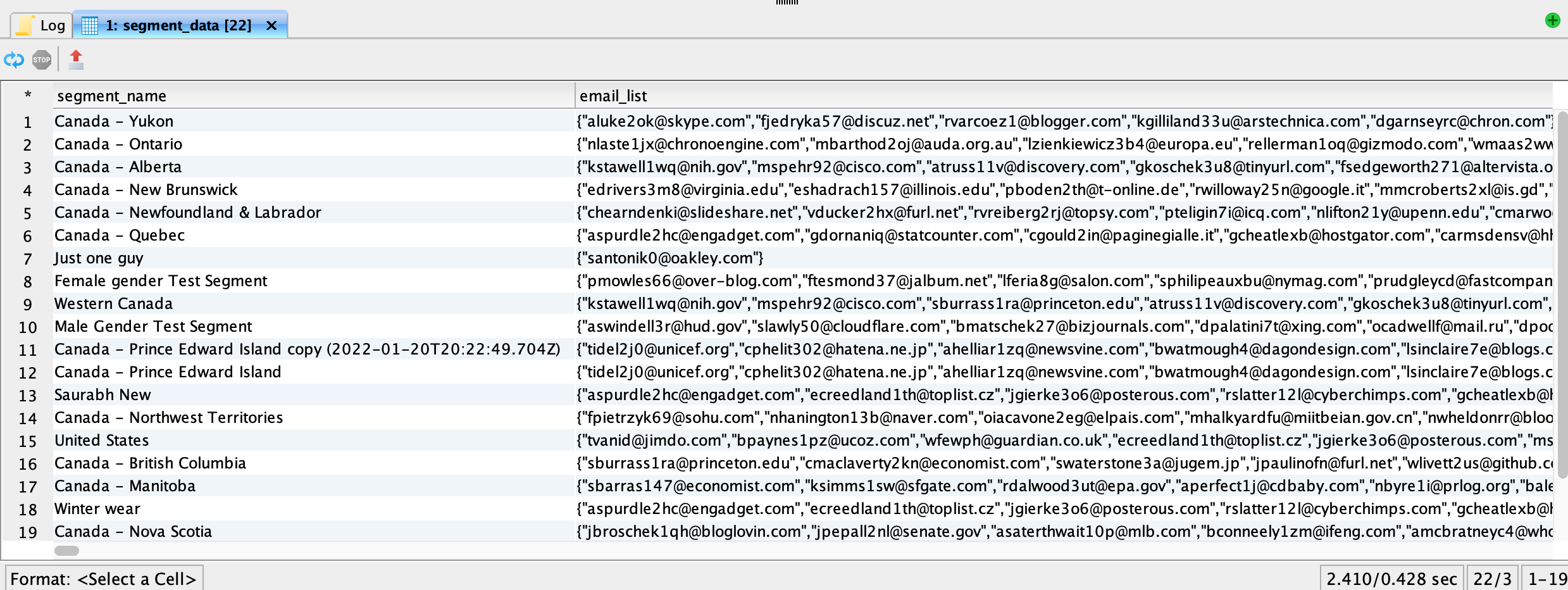
## Generate Emails Associated with a Segment Name

{% code overflow="wrap" %}

```sql
SELECT segment_name, array_agg(email) as email_list, array_agg(crmid) as crm_list
FROM segment_data
GROUP BY segment_name;
```

{% endcode %}

<figure><img src="https://1899859430-files.gitbook.io/~/files/v0/b/gitbook-x-prod.appspot.com/o/spaces%2FEhcgqFIfGdE0GXJzi5yR%2Fuploads%2Fynb8rHo2PYiMZwgHCo52%2FScreen%20Shot%202023-06-22%20at%203.58.53%20PM.png?alt=media&#x26;token=a2e402cd-c515-443f-91e5-eed2ca79f5b6" alt=""><figcaption><p>Query result</p></figcaption></figure>

## Generate Segments Associated with an Email Address

```sql
SELECT email, array_agg(segment_name)
FROM segment_data
GROUP BY email
```

<figure><img src="https://1899859430-files.gitbook.io/~/files/v0/b/gitbook-x-prod.appspot.com/o/spaces%2FEhcgqFIfGdE0GXJzi5yR%2Fuploads%2FkE2SZKyIfKimbYcXYmvr%2FScreen%20Shot%202023-06-22%20at%203.59.10%20PM.png?alt=media&#x26;token=17832dd9-805a-4332-a349-2e239cca509b" alt=""><figcaption><p>Query Result</p></figcaption></figure>

## 3 Segment Overlap

{% code overflow="wrap" %}

```sql
SELECT * FROM (SELECT UID, array_agg(segment_name) AS seg_array FROM segment_data GROUP BY UID) WHERE array_contains(seg_array, 'United States') AND array_contains(seg_array, 'Saurabh New') AND array_contains(seg_array, 'Winter wear')
```

{% endcode %}

<figure><img src="https://1899859430-files.gitbook.io/~/files/v0/b/gitbook-x-prod.appspot.com/o/spaces%2FEhcgqFIfGdE0GXJzi5yR%2Fuploads%2FOr38zpIa0KAYVdK1oJrj%2FScreen%20Shot%202023-06-22%20at%203.59.32%20PM.png?alt=media&#x26;token=c1b09017-9915-4392-aa40-9f88e8af9b6c" alt=""><figcaption><p>Query Result</p></figcaption></figure>

## 4 Segment Overlap

{% code overflow="wrap" %}

```sql
SELECT * FROM (SELECT UID, array_agg(segment_name) AS seg_array FROM segment_data GROUP BY UID)
WHERE array_contains(seg_array, 'United States') AND array_contains(seg_array, 'Saurabh New') AND array_contains(seg_array, 'Winter wear') 
AND array_contains(seg_array, 'Male Gender Test Segment')
```

{% endcode %}

Even before we typed this query, we should have been able to predict the kinds of answers we would have gotten. The lowest-sized audience will give you the upper limit on the overlap. Can you figure out which of these segments is that?

However, if we execute the query, we see the not-so-surprising result.&#x20;

<figure><img src="https://1899859430-files.gitbook.io/~/files/v0/b/gitbook-x-prod.appspot.com/o/spaces%2FEhcgqFIfGdE0GXJzi5yR%2Fuploads%2FFz5Z8jx19WRgTTvXfETC%2FScreen%20Shot%202023-06-22%20at%204.18.09%20PM.png?alt=media&#x26;token=7904d3a6-03b2-433f-8320-208d4bc08e9e" alt=""><figcaption><p>Query result.</p></figcaption></figure>