# EXPLORE 400: Exploring Offer Decisioning Datasets with Data Distiller

## Prerequisites <a href="#prerequisites" id="prerequisites"></a>

You need a basic understanding of how to write nested queries and working with nested data.&#x20;

{% content-ref url="../prep-501-ingesting-json-test-data-into-adobe-experience-platform" %}
[prep-501-ingesting-json-test-data-into-adobe-experience-platform](https://data-distilller.gitbook.io/adobe-data-distiller-guide/prep-501-ingesting-json-test-data-into-adobe-experience-platform)
{% endcontent-ref %}

You should get familiar with navigating around with web data:

{% content-ref url="explore-201-exploring-web-analytics-data-with-data-distiller" %}
[explore-201-exploring-web-analytics-data-with-data-distiller](https://data-distilller.gitbook.io/adobe-data-distiller-guide/unit-2-data-distiller-data-exploration/explore-201-exploring-web-analytics-data-with-data-distiller)
{% endcontent-ref %}

You should also familiarize yourself with AJO System Datasets:

{% content-ref url="explore-300-exploring-adobe-journey-optimizer-system-datasets-with-data-distiller" %}
[explore-300-exploring-adobe-journey-optimizer-system-datasets-with-data-distiller](https://data-distilller.gitbook.io/adobe-data-distiller-guide/unit-2-data-distiller-data-exploration/explore-300-exploring-adobe-journey-optimizer-system-datasets-with-data-distiller)
{% endcontent-ref %}

## Offer Decisioning Framework

The journey begins with **activities**, which are broad tasks or campaigns defining when and where offers will be shown. Within each activity, **placements** define the specific locations (e.g., web banners or emails) where **offers** will be delivered. The **decisioning engine** then uses **eligibility rules**, **ranking algorithms**, and **profile constraints** to determine which offer—either a **personalized offer** or a **fallback offer**—is most appropriate for each user in a specific **placement**. When a decision is made, it generates a **decision event**, which captures the result of that interaction, including the offer proposition and user engagement with the offer. All these components work together to ensure that users receive the most relevant and timely offers during their journey.

### **Decisions**

At the core of Adobe Journey Optimizer’s offer delivery system is the **decision-making process**. Decisions are the rules and criteria that determine which offers are presented to a user. Every decision is influenced by a variety of factors, including **profile constraints**, **contextual data**, and **business rules**. Decisions can be thought of as the "brains" behind which offer gets presented at any point in the customer journey. They involve multiple steps:

* **Contextual data** is real-time information about the user's current environment, such as time, location, device, and session activity. It helps tailor offers based on what’s happening at the moment. For example, users near a store might receive location-based promotions, or users on a mobile device could see mobile-optimized offers. Contextual data ensures offers are timely and suited to the user's immediate situation.
* **Eligibility**: Decides whether a user qualifies for certain offers based on their profile.
* **Ranking**: Determines the priority and relevance of offers using scoring and/or rules.
* **Constraints**: Factors such as time, placement, and profile attributes that limit when and how offers can be shown.
  * **Profile constraints** are rules based on a user's demographics, behavior, preferences, and audience segments that determine offer eligibility. These include factors like age, location, past purchases, and membership in loyalty programs. For example, a luxury car promotion might only be shown to high-income users or frequent shoppers. By using profile constraints, brands ensure that offers are highly relevant to each individual.

Decisions drive the selection process for offers, taking into account **activities** and **placements** to determine the best offer for a user in a given context.

### **Offers**

An **offer** is the actual content or proposition presented to users. Offers could be discounts, product recommendations, promotions, or other types of personalized content that a brand wants to deliver. Offers are stored in the **Offer Library** and can be dynamically selected based on the decision criteria. Offers contain:

* **Content**: The actual message or media delivered to users (e.g., banners, emails).
* **Metadata**: Details like offer name, description, and associated rules or tags.

There are different types of offers based on how they are chosen and delivered, which brings us to **personalized offers** and **fallback offers**.

### **Personalized Offers**

**Personalized offers** are a special type of offer tailored specifically to individual users. These offers are selected based on detailed user profiles, contextual data, and behavior. The **Personalized Offers Dataset** provides data about the content and customization of these offers, including the rules that will be applied to personalize the offer to a specific user.&#x20;

### **Fallback Offers**

A **fallback offer** is presented when no personalized offer meets the eligibility or decisioning criteria. In cases where primary offers fail (due to constraints like timing, audience mismatch, or other criteria), fallback offers ensure that some content is still delivered to the user. The **Fallback Offers Dataset** captures data about the fallback logic and the conditions under which these offers are shown. While fallback offers are secondary to personalized offers, they help maintain engagement when personalization fails.

### **Placements**

**Placements** are the designated spaces or contexts where offers are shown to users. A placement could be a web page banner, an email slot, an in-app message, or any other digital location where an offer might appear. Placements are critical in determining **where** and **how** an offer is delivered. Each placement has:

* **Channel information**: Where the content will be displayed (e.g., web, email, mobile).
* **Media type constraints**: Ensures the content format (e.g., image, text, video) matches the requirements of the placement.
* **Description and names**: Describes the function and role of the placement (e.g., "homepage banner").

The **Placements Dataset** stores data about these locations, ensuring that the right offer is rendered in the right place at the right time.

### **Activities**

**Activities** are the overarching campaigns or tasks that determine when and how offers are presented within a customer journey. An activity could be an email campaign, an ad shown during a promotion, or a banner placed on a website. The **activity** serves as the **container** for offers and is tied to specific **placements** and **decisions**.

**Activities** can have multiple properties:

* **Start and End Time**: Determines the timeframe during which the activity is active.
* **Ranking and Eligibility**: Tied to the decisioning rules that determine which offers are shown during the activity.
* **Fallback and Constraints**: Includes rules for fallback offers if no primary offers are eligible.

The **Activities Dataset** captures much of the logic behind activities, including ranking and placement constraints.

### **Decision Events**

A **decision event** is a **time-stamped interaction** that records what happened when a decision was made. It is essentially the **event log** that shows which offers were presented, accepted, or rejected by users. The **ODE (Offer Decision Events) Dataset** records these events, providing detailed information about each decision that occurred during a user’s interaction. Each decision event captures:

* **Timestamp**: When the event occurred.
* **Proposition details**: The offer that was proposed.
* **Interaction outcome**: Whether the user accepted, clicked, or ignored the offer.
* **Placement and activity context**: Where the offer was placed and within which activity the decision was made.

Decision events allow marketers to track the effectiveness of their offers and adjust their decisioning strategies based on user engagement and outcomes.

## High Level Overview of Offer Decisions

Before diving into the datasets, it's crucial to first understand the specifics of the business process—specifically, the steps a user takes to configure the system that generates the datasets. This understanding lays the foundation for meaningful analysis, and without it, grasping the context behind the data becomes much more challenging.

1. Navigate to **Decision Management->Offers->Offers->Create Offer**

<figure><img src="https://1899859430-files.gitbook.io/~/files/v0/b/gitbook-x-prod.appspot.com/o/spaces%2FEhcgqFIfGdE0GXJzi5yR%2Fuploads%2FOgu3CVIi4VgbLlJmntFb%2FScreen%20Shot%202024-09-30%20at%203.06.52%20PM.png?alt=media&#x26;token=34cf9576-558b-42e2-9cd8-55367c83c981" alt=""><figcaption><p>Personalized or Fallback offer optiions.</p></figcaption></figure>

2. Offers have a time-to-live and include attributes referred to as Characteristics within the datasets.

<figure><img src="https://1899859430-files.gitbook.io/~/files/v0/b/gitbook-x-prod.appspot.com/o/spaces%2FEhcgqFIfGdE0GXJzi5yR%2Fuploads%2FvUZN8l0dR7WRRZkbFxkf%2FScreen%20Shot%202024-09-30%20at%203.08.14%20PM.png?alt=media&#x26;token=eb993e31-02be-44a2-bc23-92637f442f3a" alt=""><figcaption><p>Offer configuration</p></figcaption></figure>

3. You can apply constraints at the offer level to control who can view it and limit the frequency of how many times the offer is shown within a specific time period.

<figure><img src="https://1899859430-files.gitbook.io/~/files/v0/b/gitbook-x-prod.appspot.com/o/spaces%2FEhcgqFIfGdE0GXJzi5yR%2Fuploads%2FjyYp65b8nGrWZJqLRxC0%2FScreen%20Shot%202024-09-30%20at%203.09.03%20PM.png?alt=media&#x26;token=2c73fbb3-f416-40b2-a9f5-d944cb61f2f9" alt=""><figcaption><p>Offers can be constrainted in what they do. </p></figcaption></figure>

4. You can add a decision rule as well:

<figure><img src="https://1899859430-files.gitbook.io/~/files/v0/b/gitbook-x-prod.appspot.com/o/spaces%2FEhcgqFIfGdE0GXJzi5yR%2Fuploads%2F5lnRqcBXqbJhGRGZGDve%2FScreen%20Shot%202024-09-30%20at%203.09.44%20PM.png?alt=media&#x26;token=33adb716-884c-4665-8157-48e580687897" alt=""><figcaption><p>You can add a decision rule.</p></figcaption></figure>

5. The representation is where you define the placement, assets, and the channel through which the offer will be displayed.

<figure><img src="https://1899859430-files.gitbook.io/~/files/v0/b/gitbook-x-prod.appspot.com/o/spaces%2FEhcgqFIfGdE0GXJzi5yR%2Fuploads%2FBjbHxuD9vWzFUxtl9BDx%2FScreen%20Shot%202024-09-30%20at%203.10.54%20PM.png?alt=media&#x26;token=ffead0e9-b6df-428e-97de-cac446dec05a" alt=""><figcaption><p>Representation focuses on channel delivery and placement</p></figcaption></figure>

6. Offers have to be part of an offers collection on which decision rules will be applied. Navigate to **Decision Management->Offers->Collections->Create Collection**

<figure><img src="https://1899859430-files.gitbook.io/~/files/v0/b/gitbook-x-prod.appspot.com/o/spaces%2FEhcgqFIfGdE0GXJzi5yR%2Fuploads%2FT5lHpVujTXeVMtyzFL8L%2FScreen%20Shot%202024-09-30%20at%203.14.31%20PM.png?alt=media&#x26;token=8d4d541f-5a53-4503-85de-8e4132445414" alt=""><figcaption><p>Create a new collection and you can edit an existing one.</p></figcaption></figure>

7. You can add offers to this collection

<figure><img src="https://1899859430-files.gitbook.io/~/files/v0/b/gitbook-x-prod.appspot.com/o/spaces%2FEhcgqFIfGdE0GXJzi5yR%2Fuploads%2FtPeKlVzr55IOZiKJdNuV%2FScreen%20Shot%202024-09-30%20at%203.14.44%20PM.png?alt=media&#x26;token=25115f5f-569b-4ef4-9258-334b0535adfe" alt=""><figcaption><p>Adding offers to a collection</p></figcaption></figure>

8. Navigate to **Decision Management->Offers->Collections->Create Decision.** Decisions have a time to live,

<figure><img src="https://1899859430-files.gitbook.io/~/files/v0/b/gitbook-x-prod.appspot.com/o/spaces%2FEhcgqFIfGdE0GXJzi5yR%2Fuploads%2FF6QfZsd2GSEC5zLWh6pS%2FScreen%20Shot%202024-09-30%20at%203.37.35%20PM.png?alt=media&#x26;token=05837c66-d807-4c3d-86a0-27a8af91cfc5" alt=""><figcaption><p>Decision rule configuration.</p></figcaption></figure>

9. You will need to add a decision scope, which is essentially a grouped set of rules, and specify a placement.

<figure><img src="https://1899859430-files.gitbook.io/~/files/v0/b/gitbook-x-prod.appspot.com/o/spaces%2FEhcgqFIfGdE0GXJzi5yR%2Fuploads%2F0gEAaLTAsk60P3yuqaZm%2FScreen%20Shot%202024-09-30%20at%203.38.01%20PM.png?alt=media&#x26;token=2fc67a9e-823e-4a62-ac86-350c1f4f8daf" alt=""><figcaption><p>Decision rule in a decision scope.</p></figcaption></figure>

10. You will need to add a offer collection

<figure><img src="https://1899859430-files.gitbook.io/~/files/v0/b/gitbook-x-prod.appspot.com/o/spaces%2FEhcgqFIfGdE0GXJzi5yR%2Fuploads%2FpPEO0p7tZJYVHEF4Ywck%2FScreen%20Shot%202024-09-30%20at%203.38.10%20PM.png?alt=media&#x26;token=f23214e8-eb6b-40b7-bde2-1fe317156016" alt=""><figcaption><p>You can add an offer collection</p></figcaption></figure>

11. With multiple offers available, you can select the audience, algorithm, and other criteria to determine the winning offer. Some offers will be eliminated at this stage if they do not meet the specified criteria.

<figure><img src="https://1899859430-files.gitbook.io/~/files/v0/b/gitbook-x-prod.appspot.com/o/spaces%2FEhcgqFIfGdE0GXJzi5yR%2Fuploads%2FyJVukkI81Zaj4RUAS3VB%2FScreen%20Shot%202024-09-30%20at%203.38.31%20PM.png?alt=media&#x26;token=d655bb82-ee4c-42e6-9031-efc970b7b362" alt=""><figcaption><p>Decision rules impose further constraints</p></figcaption></figure>

12. Every decision rule requires a fallback offer:

<figure><img src="https://1899859430-files.gitbook.io/~/files/v0/b/gitbook-x-prod.appspot.com/o/spaces%2FEhcgqFIfGdE0GXJzi5yR%2Fuploads%2FvJXf4m5saZUVrvGYZp93%2FScreen%20Shot%202024-09-30%20at%203.38.40%20PM.png?alt=media&#x26;token=fa515138-b016-4803-a8d9-6953241f8cc7" alt=""><figcaption><p>Fallback offer selection</p></figcaption></figure>

13. Decision rule on the offer collection which can now be activated.

<figure><img src="https://1899859430-files.gitbook.io/~/files/v0/b/gitbook-x-prod.appspot.com/o/spaces%2FEhcgqFIfGdE0GXJzi5yR%2Fuploads%2FC3AeN7uDCEECZvdfOzfJ%2FScreen%20Shot%202024-09-30%20at%203.38.47%20PM.png?alt=media&#x26;token=3405b5ae-6417-4388-bb2d-d7b08cb66d4c" alt=""><figcaption><p>Final configuration</p></figcaption></figure>

## Decisions Object Repository - Activities Dataset

The **Decisions Object Repository - Activities Dataset** contains additional information that is more focused on the **decision-making logic and criteria** behind offer selection ot be done.

* #### **Criteria and Constraints**: The **Activities Dataset** provides detailed information about the **criteria** used to make decisions, such as the constraints that are applied based on profile information, context, and eligibility rules.  Fields like **`_experience.decisioning.criteria`**, **`_experience.decisioning.criteria.profileConstraints`**, and **`_experience.decisioning.criteria.placements`** describe the rules, constraints, and filters applied during decision-making.
* **Ranking and Prioritization**: The  **Activities Dataset** contains detailed fields about how offers are ranked and prioritized, including **scoring functions** and **ranking strategies**. Fields like **`_experience.decisioning.criteria.ranking`**, **`_experience.decisioning.criteria.ranking.order`**, and **`_experience.decisioning.criteria.ranking.priority`** describe how offers are ranked based on scores or priorities.
* **Fallback Option Logic**: The  **Activities Dataset** contains fields related to **fallback options** and detailed logic about how and why fallback options are selected if regular options do not qualify. Fields like **`_experience.decisioning.criteria.fallback`** explain the conditions under which fallback options are selected, including the logic behind their use.
* **Process:** The **Activities Dataset**  provides additional metadata related to the **decision-making process**, such as workflow identifiers (**`_experience.decisioning.batchID`**) and revision tracking (ETags). **Activities Dataset** : Includes fields like **`_experience.decisioning.batchID`, `_repo.etag`**, and **`_experience.decisioning.criteria.propositionContentKey`**, which help track the versioning and batch processing behind the decision events.
* **Profile and Audience Constraints**: The  **Activities Dataset** includes detailed **profile constraints** and how segments or rules are applied to profiles to determine the eligibility of an offer. Fields like **`_experience.decisioning.criteria.profileConstraints`**, **`_experience.decisioning.criteria.profileConstraintType`**, and **`_experience.decisioning.criteria.segmentIdentities`** are used to track the audiences and segments that influence decisions.:
* **Ranking Details**: The **Decisions Object Repository - Activities Dataset** has specific fields that explain how the **best option** is determined, including ranking orders and scoring functions. It includes fields like **`_experience.decisioning.criteria.ranking.orderEvaluationType`**, which specify how options are evaluated and ranked.

### Understand the Structure of the Activities Dataset

```sql
SELECT 
   table_name, 
   column_name, 
   data_type 
FROM 
   information_schema.columns
where table_name = 'decision_object_repository_activities'
```

The result is:

<figure><img src="https://1899859430-files.gitbook.io/~/files/v0/b/gitbook-x-prod.appspot.com/o/spaces%2FEhcgqFIfGdE0GXJzi5yR%2Fuploads%2F3Zeo5VNLaTnYkIPzcDyX%2FScreen%20Shot%202024-09-30%20at%207.38.06%20AM.png?alt=media&#x26;token=f9cb5a05-4566-4192-b07b-e6a2b16f9f03" alt=""><figcaption><p>Top level columns in the Activities dataset. </p></figcaption></figure>
### Explore the Structure of the Activities Dataset

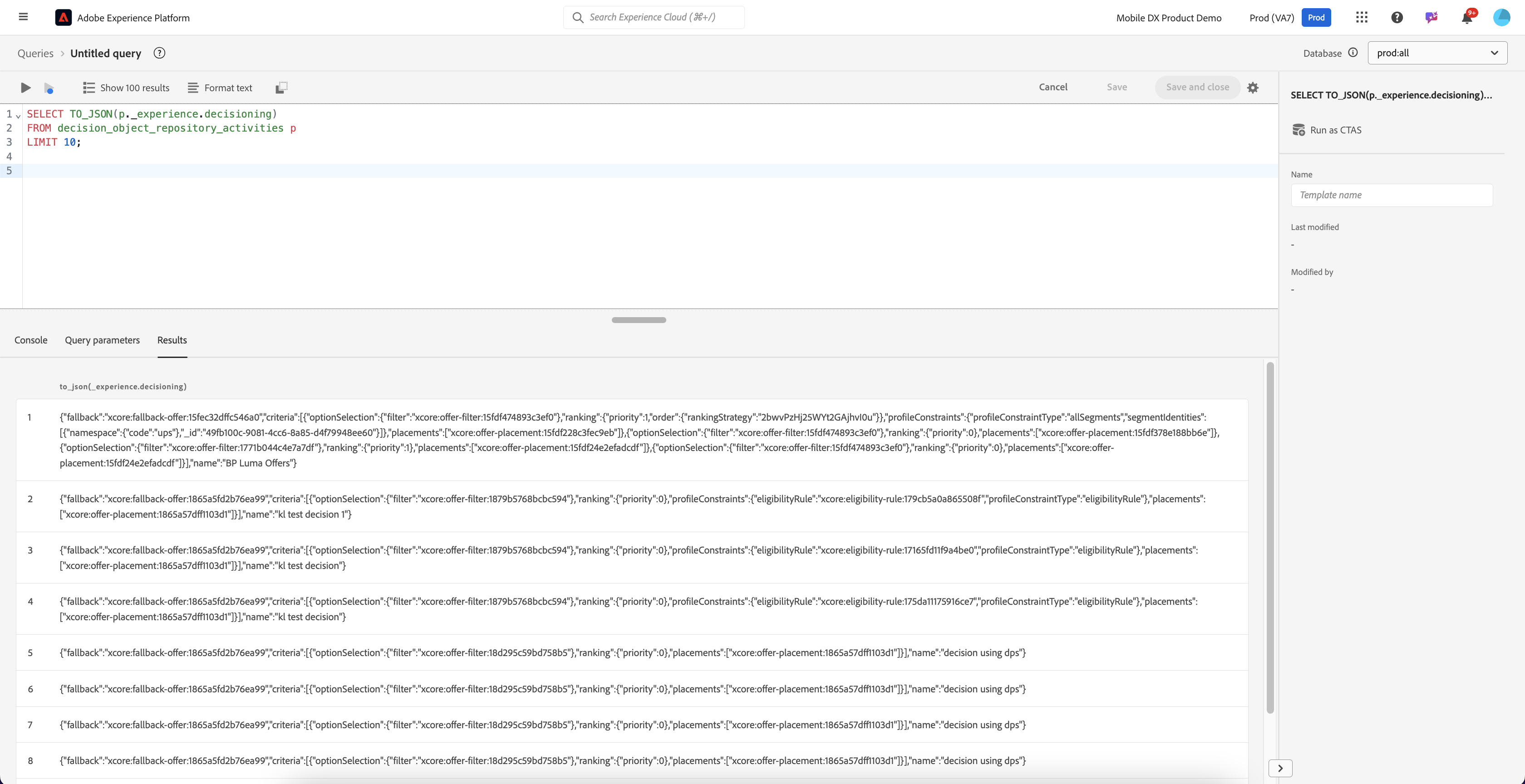
```sql
SELECT to_json(p._experience.decisioning) 
FROM decision_object_repository_activities p
LIMIT 10;
```

<figure><img src="https://1899859430-files.gitbook.io/~/files/v0/b/gitbook-x-prod.appspot.com/o/spaces%2FEhcgqFIfGdE0GXJzi5yR%2Fuploads%2FIDSQR28u2OKJmXzCO4VX%2FScreen%20Shot%202024-09-30%20at%201.45.43%20PM.png?alt=media&#x26;token=cc68b6b7-91a7-4b07-a6e8-a9f1d76129eb" alt=""><figcaption><p>Explore the fields under _experience.decisioning.</p></figcaption></figure>

### Retrieve Records from the Activities Dataset

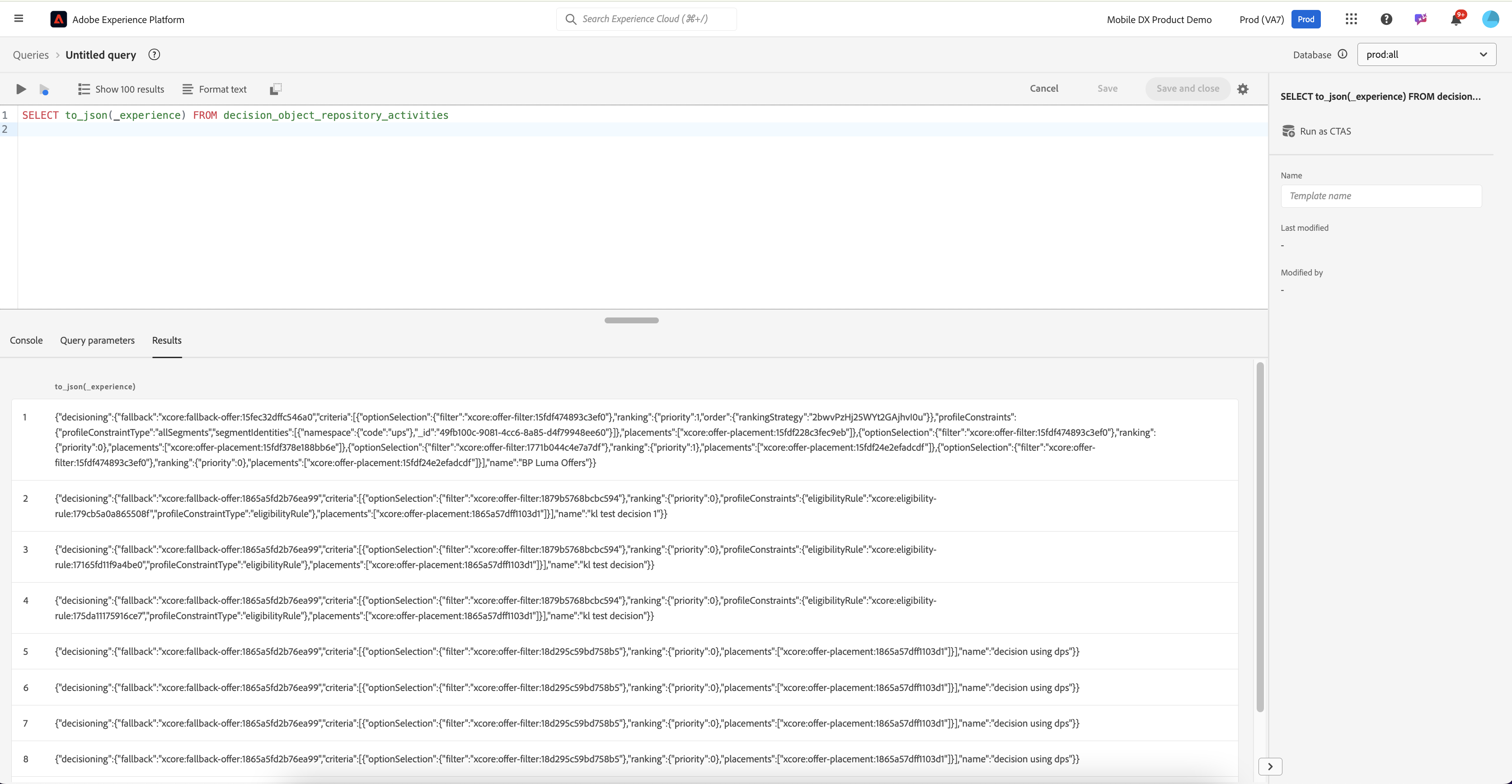
```sql
SELECT to_json(_experience) FROM decision_object_repository_activities;
```

The result is:

<figure><img src="https://1899859430-files.gitbook.io/~/files/v0/b/gitbook-x-prod.appspot.com/o/spaces%2FEhcgqFIfGdE0GXJzi5yR%2Fuploads%2FTKdNwM6D39UXOWy749Ln%2FScreen%20Shot%202024-09-30%20at%208.43.08%20AM.png?alt=media&#x26;token=ca7532b5-9db7-4727-a8ff-aa9d7e613ed7" alt=""><figcaption><p>Records retrieved from the Activities Dataset. </p></figcaption></figure>

### Retrieve Decisioning Criteria for Offers

This query will show you the **decisioning criteria** (the rules or algorithms) applied for each activity. This might include complex decisioning logic, filters, and algorithms.

```sql
SELECT 
    p._id AS activityId,
    p._experience.decisioning.name AS activityName,
    p._experience.decisioning.criteria AS decisioningCriteria
FROM 
    decision_object_repository_activities p
WHERE 
    p._experience.decisioning.criteria IS NOT NULL;
```

The results will be:

<figure><img src="https://1899859430-files.gitbook.io/~/files/v0/b/gitbook-x-prod.appspot.com/o/spaces%2FEhcgqFIfGdE0GXJzi5yR%2Fuploads%2FyJQAU9635IxV40Rr48lU%2FScreen%20Shot%202024-09-30%20at%2010.52.52%20AM.png?alt=media&#x26;token=f6a25e2a-519c-4490-80e6-f0cc5acd402a" alt=""><figcaption><p>Results of the decision criteria query</p></figcaption></figure>

To understand this result, let us navigate to **Offers->Decisions->BP Luma Offers in the AEP UI**

<figure><img src="https://1899859430-files.gitbook.io/~/files/v0/b/gitbook-x-prod.appspot.com/o/spaces%2FEhcgqFIfGdE0GXJzi5yR%2Fuploads%2FW2HxxjnswV6R7uU6Z4p3%2FScreen%20Shot%202024-09-30%20at%202.50.17%20PM.png?alt=media&#x26;token=e2aada99-aa25-4de5-9212-54fcc265604c" alt=""><figcaption><p>BP Luma offers decision activity</p></figcaption></figure>

Let us correlate the result of the query for BPLumaOffes(first line of the result) and the above:

* **Activity ID Match**: Both the query and the screenshot reference the same **activity ID** (`xcore:offer-activity:15fec9f63011bd8`), meaning they are referring to the same decision-making process.
* **Placements**:
  * The query returns specific **placements** where offers are shown, such as `"xcore-offer-placement:15fdf378e188bb6e"`, which likely corresponds to one of the placements like **Luma - Home Banner.**
  * Multiple placements are involved in the same activity, just as in the screenshot where offers are placed in **banners**, **cards**, and **emails**.
  * This would require us to pull metadata about the placements from the **Placements Dataset**.
* **Decisioning Criteria and Filters**:
  * The query result shows the **decision filters** applied (e.g., `"xcore-offer-filter:15fdf474893c3ef0"`), which control which offers are shown based on the user's profile, context, and placement.
  * The **eligibility criteria** shown in the query match the **audience eligibility** shown in the above screenshot (e.g., `"allSegments"` in the query vs. "1 audience" in the screenshot).
* **Ranking Methods**:
  * Note that the query result doesn’t explicitly show the ranking method, but we know from the screenshot that the **ranking method** for certain placements is based on a **personalized model** (e.g., "Luma Personalized Model" for the Home Banner). In other placements, it is based on **offer priority**.
* **Fallback Offer**:
  * The **fallback offer** shown in the query (`xcore:fallback-offer:15fec32dffc546a0`) matches the fallback offer in the screenshot ("BP Luma - Fallback"). This confirms that the system will show the fallback offer if none of the primary offers qualify

## Decisions Object Repository - Personalized Offers Dataset

The **Personalized Offers Dataset** represents personalized offers that are **created and prepared** to be served to users based on various decision-making logic. This dataset includes extensive metadata on offer content, audience segmentation, eligibility rules, and decision criteria, allowing you to tailor offers based on user profiles, behaviors, and contextual data. It also captures the ranking, scoring, and prioritization mechanisms used to determine which personalized offers are presented to users in different scenarios.&#x20;

**Key Features in Personalized Offers Dataset**

* **Profile Constraints**: The **Personalized Offers Dataset** provides detailed rules and constraints regarding which offers are eligible for certain user profiles, ensuring that offers are customized to meet individual needs. Fields like **`_experience.decisioning.profileConstraints`**, **`_experience.decisioning.profileConstraintType`**, and **`_experience.decisioning.segmentIdentities`** detail the rules applied based on user profiles and segments.
* **Content Components**: The **Personalized Offers Dataset** captures granular details about the **content** associated with personalized offers, including various language variants, formats, and delivery methods. Fields like **`_experience.decisioning.contents`**, **`_experience.decisioning.contents.components.language`**, and **`_experience.decisioning.contents.components.format`** provide detailed metadata about the structure of personalized offer content.
* **Ranking and Prioritization**: The **Personalized Offers Dataset** contains fields related to **ranking strategies**, **scoring functions**, and **order evaluation**, allowing for complex decision-making regarding which offers are prioritized for users. Fields like **`_experience.decisioning.ranking`**, **`_experience.decisioning.orderEvaluationType`**, and **`_experience.decisioning.rankingStrategy`** provide detailed ranking logic.
* **Lifecycle Management**: The **Personalized Offers Dataset** tracks the **lifecycle status** of each offer, allowing for better workflow management by indicating whether an offer is in draft, approved, live, or archived state. Fields like `lifecycleStatus` track the status of offers, ensuring proper management of their visibility and usage in campaigns.

### Understand Structure of Personalized Offers Dataset

```sql
SELECT 
   table_name, 
   column_name, 
   data_type 
FROM 
   information_schema.columns
where table_name = 'decision_object_repository_personalized_offers'
```

You should get:

<figure><img src="https://1899859430-files.gitbook.io/~/files/v0/b/gitbook-x-prod.appspot.com/o/spaces%2FEhcgqFIfGdE0GXJzi5yR%2Fuploads%2FWtLzq8R13Yl1u1nJcgxX%2FScreen%20Shot%202024-09-30%20at%207.14.52%20AM.png?alt=media&#x26;token=0fa1979f-d5d9-4e34-a9bb-b59b390f0540" alt=""><figcaption><p>Top level columns within the dataset</p></figcaption></figure>

### Retrieve Records from Personalized Offers Dataset

{% code overflow="wrap" %}

```sql
SELECT to_json(_experience) FROM decision_object_repository_personalized_offers
```

{% endcode %}

<figure><img src="https://1899859430-files.gitbook.io/~/files/v0/b/gitbook-x-prod.appspot.com/o/spaces%2FEhcgqFIfGdE0GXJzi5yR%2Fuploads%2FODspDVHMqjYALk3bWwCf%2FScreen%20Shot%202024-09-29%20at%2010.33.24%20PM.png?alt=media&#x26;token=e1af00af-4b74-4989-9799-3e319927cdd9" alt=""><figcaption><p>Contents of the Persoalized Offers Dataset</p></figcaption></figure>

The results you will get will look like this in JSON:

{% code overflow="wrap" %}

```json
{
  "decisioning": {
    "ranking": {
      "priority": 0
    },
    "name": "BP Luma - Loyalty Membership",
    "contents": [
      {
        "placement": "xcore:offer-placement:15fdf228c3fec9eb",
        "components": [
          {
            "_dc": {
              "format": "image/png"
            },
            "_type": "https://ns.adobe.com/experience/offer-management/content-component-imagelink",
            "deliveryURL": "https://dpqy7l2qgw0r3.cloudfront.net/0aa64df0-e3ce-11e9-ace4-cb8a25ba725b/urn:aaid:aem:8b68c634-151e-4059-a626-a95fdc4e1833/oak:1.0::ci:b7e14744a2dde9486e0a9a45cb9a9e28/93b54966-7c78-3b23-8afb-649f0e8acff8",
            "linkURL": "https://luma.enablementadobe.com/content/luma/us/en/community/members.html",
            "_repo": {
              "name": "Loyalty Banner.png",
              "resolveURL": "https://author-p28416-e87881.adobeaemcloud.com/content/dam/BP/Luma/Loyalty%20Banner.png/jcr%3Acontent/renditions/cq5dam.thumbnail.140.100.png?cacheinfo=653eb618fef5c459aed4b796501437a5",
              "id": "urn:aaid:aem:8b68c634-151e-4059-a626-a95fdc4e1833"
            }
          }
        ]
      },
      {
        "placement": "xcore:offer-placement:15fdf378e188bb6e",
        "components": [
          {
            "_dc": {
              "format": "image/png"
            },
            "_type": "https://ns.adobe.com/experience/offer-management/content-component-imagelink",
            "deliveryURL": "https://dpqy7l2qgw0r3.cloudfront.net/0aa64df0-e3ce-11e9-ace4-cb8a25ba725b/urn:aaid:aem:d4e92f28-38b5-4e14-a7ab-9f6bf6cd7dc1/oak:1.0::ci:3cf0cda086124eae041430323016d94b/de10b283-7648-3f0e-a9c9-bfbe59b01b30",
            "linkURL": "https://luma.enablementadobe.com/content/luma/us/en/community/members.html",
            "_repo": {
              "name": "Loyalty Card.png",
              "resolveURL": "https://author-p28416-e87881.adobeaemcloud.com/content/dam/BP/Luma/Loyalty%20Card.png/jcr%3Acontent/renditions/cq5dam.thumbnail.140.100.png?cacheinfo=a3bd18f557beb74edd958adfb0a1cc17",
              "id": "urn:aaid:aem:d4e92f28-38b5-4e14-a7ab-9f6bf6cd7dc1"
            }
          }
        ]
      },
      {
        "placement": "xcore:offer-placement:15fdf24e2efadcdf",
        "components": [
          {
            "_dc": {
              "format": "image/png"
            },
            "_type": "https://ns.adobe.com/experience/offer-management/content-component-imagelink",
            "deliveryURL": "https://dpqy7l2qgw0r3.cloudfront.net/0aa64df0-e3ce-11e9-ace4-cb8a25ba725b/urn:aaid:aem:8b68c634-151e-4059-a626-a95fdc4e1833/oak:1.0::ci:b7e14744a2dde9486e0a9a45cb9a9e28/93b54966-7c78-3b23-8afb-649f0e8acff8",
            "linkURL": "https://luma.enablementadobe.com/content/luma/us/en/community/members.html",
            "_repo": {
              "name": "Loyalty Banner.png",
              "resolveURL": "https://author-p28416-e87881.adobeaemcloud.com/content/dam/BP/Luma/Loyalty%20Banner.png/jcr%3Acontent/renditions/cq5dam.thumbnail.140.100.png?cacheinfo=653eb618fef5c459aed4b796501437a5",
              "id": "urn:aaid:aem:8b68c634-151e-4059-a626-a95fdc4e1833"
            }
          }
        ]
      }
    ],
    "calendarConstraints": {
      "startDate": "2022-10-25T06:00:00.000Z",
      "endDate": "2050-05-31T06:00:00.000Z"
    },
    "profileConstraints": {
      "profileConstraintType": "none"
    },
    "lifecycleStatus": "approved",
    "tags": [
      "xcore:tag:1771ac5a22abb9f7",
      "xcore:tag:15fdf3abddd39b68"
    ]
  }
}

```

{% endcode %}

#### Explanation of Fields:

1. **`decisioning`**: This is the top-level object that encapsulates all decisioning details related to this offer.
   * **`ranking`**:
     * **`priority`**: The ranking priority of this offer. A value of `0` typically indicates the highest priority.
   * **`name`**: The name of the offer, here labeled as **"BP Luma - Loyalty Membership"**, which may indicate that this is an offer targeted at customers in a loyalty membership program.
2. **`contents`**: This array holds multiple **offer placements**. Each object within the `contents` array represents one placement of the offer in a specific location or context (e.g., on a website, in an app).
   * **`placement`**: This is a unique identifier for where the offer will appear (e.g., a banner on a webpage or in-app placement).
   * **`components`**:
     * Each component describes the content used in that placement (e.g., an image, text, or link).
     * **`_dc.format`**: The format of the content (e.g., "image/png" for PNG image).
     * **`_type`**: The type of content component, here it's an image link, pointing to an external resource.
     * **`deliveryURL`**: The URL where the content (image) is hosted.
     * **`linkURL`**: The URL the user is directed to when they interact with the content (e.g., a banner leading to a loyalty program page).
     * **`_repo`**: Contains metadata about the image asset.
       * **`name`**: The name of the asset (e.g., "Loyalty Banner.png").
       * **`resolveURL`**: A direct link to a thumbnail of the image.
       * **`id`**: A unique identifier for the asset.
3. **`calendarConstraints`**: These fields define when the offer is valid.
   * **`startDate`**: The start date of the offer (in ISO 8601 format), meaning this offer becomes active on **October 25, 2022**.
   * **`endDate`**: The end date of the offer, meaning it will expire on **May 31, 2050**.
4. **`profileConstraints`**: These fields define which user profiles are eligible for the offer.
   * **`profileConstraintType`**: The type of profile constraint applied. In this case, `"none"` means that no specific profile constraints are applied, making the offer available to all users.
5. **`lifecycleStatus`**: The current status of the offer.
   * **`approved`**: This indicates that the offer has been approved and is ready to be displayed to users.
6. **`tags`**: These are tags associated with the offer, typically used for categorization, filtering, or reporting purposes.
   * Examples of tag identifiers: `"xcore:tag:1771ac5a22abb9f7"`, `"xcore:tag:15fdf3abddd39b68"`.

### Flatten the Personalized Offers Table

{% code overflow="wrap" %}

```sql
SELECT 
    p._id AS offerId,
    p._repo.etag AS repo_etag,
    p._experience.decisioning.ranking.priority AS priority,
    p._experience.decisioning.name AS offerName,
    p._experience.decisioning.contents[0].placement AS placement,
    p._experience.decisioning.contents[0].components[0]._dc.format AS contentFormat,
    p._experience.decisioning.contents[0].components[0]._dc.language[0] AS contentLanguage,
    p._experience.decisioning.contents[0].components[0].content AS contentData,
    p._experience.decisioning.calendarConstraints.startDate AS startDate,
    p._experience.decisioning.calendarConstraints.endDate AS endDate,
    p._experience.decisioning.profileConstraints.profileConstraintType AS profileConstraintType,
    p._experience.decisioning.profileConstraints.segmentIdentities[0]._id AS segmentId,
    p._experience.decisioning.characteristics['Offer ID'] AS offerIdCharacteristic,
    p._experience.decisioning.characteristics.domain AS offerDomain,
    p._experience.decisioning.characteristics.type AS offerType,
    p._experience.decisioning.characteristics.saleType AS saleType,
    p._experience.decisioning.lifecycleStatus AS lifecycleStatus
FROM 
    decision_object_repository_personalized_offers p;

```

{% endcode %}

The field **p`._experience.decisioning.characteristics`** refers to a sub-object within the **decisioning** structure of an offer, which stores specific **characteristics** or **attributes** related to that offer. In Adobe Journey Optimizer, characteristics can be thought of as **metadata** or additional **properties** that define key details or behavior for an offer. These characteristics are typically used to differentiate offers, apply business rules, or drive personalization and optimization in decision-making.

The results are the following:

<figure><img src="https://1899859430-files.gitbook.io/~/files/v0/b/gitbook-x-prod.appspot.com/o/spaces%2FEhcgqFIfGdE0GXJzi5yR%2Fuploads%2FVB25IIl33a2gwSkR7Zre%2FScreen%20Shot%202024-09-29%20at%2010.05.34%20PM.png?alt=media&#x26;token=57227f06-710e-421e-a8c5-ef393d3c1824" alt=""><figcaption><p>Flattening the personalized offers table.</p></figcaption></figure>

### Retrieve Latest Version of Each Offer

{% code overflow="wrap" %}

```sql
SELECT 
    p._id AS offerId,
    p._repo.etag AS repo_etag,
    p._experience.decisioning.ranking.priority AS priority,
    p._experience.decisioning.characteristics.customerLoyalty AS c_customerLoyalty,
    p._experience.decisioning.characteristics['Offer ID'] AS c_offerId,
    p._experience.decisioning.characteristics.productCategory AS c_productCategory,
    p._experience.decisioning.characteristics.discountAmount AS c_discountAmount,
    p._experience.decisioning.characteristics.expiryDate AS c_expiryDate,
    p._experience.decisioning.characteristics.promotionType AS c_promotionType,
    EXPLODE(p._experience.decisioning.contents.placement) AS placementId
FROM 
    decision_object_repository_personalized_offers p
JOIN 
    (SELECT 
         m._id AS offerId, 
         MAX(m._repo.etag) AS latest_repo_etag
     FROM 
         decision_object_repository_personalized_offers m
     GROUP BY 
         m._id
    ) mx 
    ON p._id = mx.offerId
    AND p._repo.etag = mx.latest_repo_etag;
```

{% endcode %}

The results will be:

<figure><img src="https://1899859430-files.gitbook.io/~/files/v0/b/gitbook-x-prod.appspot.com/o/spaces%2FEhcgqFIfGdE0GXJzi5yR%2Fuploads%2FspsS8KkjtQXeWUtMDMKU%2FScreen%20Shot%202024-09-29%20at%2010.41.23%20PM.png?alt=media&#x26;token=ebb4e5f7-3049-4e47-8990-d8eb2016ccf3" alt=""><figcaption><p>Retrieving the latest version of an offer.</p></figcaption></figure>

&#x20;Observe the following:

* **`m._id AS offerId`**: Retrieves each offer's unique ID.
* **`MAX(m._repo.etag) AS latest_repo_etag`**: Finds the highest (latest) `_repo.etag` (which represents the version) for each offer.
* **`GROUP BY m._id`**: Ensures that the subquery groups the offers by their `_id`, so that it returns the latest version for each offer.

### Retrieve **Personalized** Offers Greater than Specific Priority

```sql
SELECT 
    p._id AS offerId,
    p._repo.etag AS repo_etag,
    p._experience.decisioning.ranking.priority AS priority,
    p._experience.decisioning.characteristics['Offer ID'] AS c_offerId
FROM 
    decision_object_repository_personalized_offers p
WHERE 
    p._experience.decisioning.ranking.priority >1;
```

<figure><img src="https://1899859430-files.gitbook.io/~/files/v0/b/gitbook-x-prod.appspot.com/o/spaces%2FEhcgqFIfGdE0GXJzi5yR%2Fuploads%2FqtLBqJAOImPpE7d80y2G%2FScreen%20Shot%202024-09-29%20at%2010.44.16%20PM.png?alt=media&#x26;token=74239abd-f813-4a97-9a2f-9499175c0fb0" alt=""><figcaption><p>Offers that had a priority greater than 1</p></figcaption></figure>

### Filter **Personalized** Offers by Date Range

```sql
SELECT 
    p._id AS offerId,
    p._repo.etag AS repo_etag,
    p._experience.decisioning.calendarConstraints.startDate AS startDate,
    p._experience.decisioning.calendarConstraints.endDate AS endDate,
    p._experience.decisioning.characteristics['Offer ID'] AS c_offerId
FROM 
    decision_object_repository_personalized_offers p
WHERE 
    p._experience.decisioning.calendarConstraints.startDate <= CURRENT_DATE
    AND p._experience.decisioning.calendarConstraints.endDate >= CURRENT_DATE;
```

<figure><img src="https://1899859430-files.gitbook.io/~/files/v0/b/gitbook-x-prod.appspot.com/o/spaces%2FEhcgqFIfGdE0GXJzi5yR%2Fuploads%2F3WSwDLqVvouZoDWMNIQi%2FScreen%20Shot%202024-09-29%20at%2010.47.56%20PM.png?alt=media&#x26;token=1b6e348f-8d3d-4580-af68-279609daa542" alt=""><figcaption><p>Personalized offers filtered by date range</p></figcaption></figure>

### Group **Personalized** Offers by Product Category

```sql
SELECT 
    p._experience.decisioning.characteristics.productCategory AS productCategory,
    COUNT(p._id) AS offerCount
FROM 
    decision_object_repository_personalized_offers p
GROUP BY 
    p._experience.decisioning.characteristics.productCategory;
```

The results will look like the following:

<figure><img src="https://1899859430-files.gitbook.io/~/files/v0/b/gitbook-x-prod.appspot.com/o/spaces%2FEhcgqFIfGdE0GXJzi5yR%2Fuploads%2FFd1OHo8cO6YpclFRbqf8%2FScreen%20Shot%202024-09-29%20at%2010.49.25%20PM.png?alt=media&#x26;token=d0eff2dc-dde6-4d80-afd0-ff0f699d82a6" alt=""><figcaption><p>Grouping offers by product category</p></figcaption></figure>

### **Retrieve Personalized Offers by Placement**

{% code overflow="wrap" %}

```sql
SELECT 
    p._id AS offerId,
    p._experience.decisioning.characteristics['Offer ID'] AS c_offerId,
    EXPLODE(p._experience.decisioning.contents.placement) AS placementId
FROM 
    decision_object_repository_personalized_offers p
WHERE 
    ARRAY_CONTAINS(p._experience.decisioning.contents.placement, 'xcore:offer-placement:15fdf228c3fec9eb');

```

{% endcode %}

<figure><img src="https://1899859430-files.gitbook.io/~/files/v0/b/gitbook-x-prod.appspot.com/o/spaces%2FEhcgqFIfGdE0GXJzi5yR%2Fuploads%2FMVVUunDTJ4twLrzZcrAy%2FScreen%20Shot%202024-09-29%20at%2010.51.40%20PM.png?alt=media&#x26;token=f02fc2bd-3256-40ae-bf38-02fb8a41108c" alt=""><figcaption><p>Offers by placement</p></figcaption></figure>

### Sort **Personalized** Offers by Priority

```sql
SELECT 
    p._id AS offerId,
    p._experience.decisioning.ranking.priority AS priority,
    p._experience.decisioning.characteristics['Offer ID'] AS c_offerId
FROM 
    decision_object_repository_personalized_offers p
ORDER BY 
    p._experience.decisioning.ranking.priority ASC;

```

<figure><img src="https://1899859430-files.gitbook.io/~/files/v0/b/gitbook-x-prod.appspot.com/o/spaces%2FEhcgqFIfGdE0GXJzi5yR%2Fuploads%2F5rCPcu1dWFywwLraZk2M%2FScreen%20Shot%202024-09-29%20at%2010.55.07%20PM.png?alt=media&#x26;token=83adfece-653a-4dbe-b58d-909b9065eb39" alt=""><figcaption><p>Offers sorted by priority</p></figcaption></figure>

### Retrieve Profile Constraints and Segment Identities

{% code overflow="wrap" %}

```sql
SELECT 
    p._id AS offerId,
    p._experience.decisioning.profileConstraints.profileConstraintType AS profileConstraintType,
    EXPLODE(p._experience.decisioning.profileConstraints.segmentIdentities) AS segmentIdentity
FROM 
    decision_object_repository_personalized_offers p;
```

{% endcode %}

<figure><img src="https://1899859430-files.gitbook.io/~/files/v0/b/gitbook-x-prod.appspot.com/o/spaces%2FEhcgqFIfGdE0GXJzi5yR%2Fuploads%2FtNlbvy5Pkct1sJZBnc2c%2FScreen%20Shot%202024-09-29%20at%2011.11.00%20PM.png?alt=media&#x26;token=07e87052-0808-4244-b4d8-a58683da2d85" alt=""><figcaption><p>Profile constraint and the segment identity</p></figcaption></figure>

{% hint style="info" %}
**`OfferID`** and **`PlacementID`** combination can act like a composite key joining this metadata sith the data in the Offer Decision Events table where the actual offer was delivered.
{% endhint %}

## Decisions Object Repository - Fallback Offers

The **Fallback Offers Dataset** is very similar to the **Personalized Offers Dataset** except that it provides a detailed record of fallback offers that should e presented when primary decisioning options do not qualify. This dataset captures rich metadata about the fallback offer content, including components, formats, delivery URLs, and asset repository details, ensuring that the offer is accurately rendered across various digital experiences. Additionally, it tracks the lifecycle status of offers, allowing for effective management of the offer’s state, whether it’s in draft, live, or archived mode. Each fallback offer is further enriched with characteristics such as tags for categorization, and placement details that specify where the offer is deployed.

{% code overflow="wrap" %}

```sql
SELECT to_json(_experience) FROM decision_object_repository_fallback_offers
```

{% endcode %}

<figure><img src="https://1899859430-files.gitbook.io/~/files/v0/b/gitbook-x-prod.appspot.com/o/spaces%2FEhcgqFIfGdE0GXJzi5yR%2Fuploads%2F1DSCHpOnNRbZD88a60WU%2FScreen%20Shot%202024-09-29%20at%2011.29.44%20PM.png?alt=media&#x26;token=7d7766e6-c65a-41c0-9543-511e540a4092" alt=""><figcaption><p>The fallback offers will look simiilar to the personalized offers.</p></figcaption></figure>

{% hint style="info" %}
You can take the same queries that we used on the Personalized Offers dataset and apply it here as the fields are identical.
{% endhint %}

{% hint style="info" %}
**`OfferID`** and **`PlacementID`** combination can act like a composite key joining this metadata sith the data in the Offer Decision Events table where the actual offer was delivered.
{% endhint %}

## Decisions Object Repository - Placements Dataset

The **Placements Dataset**  tracks the various contexts or "placements" where offers are to be delivered to users. A placement is a defined location, such as a banner on a web page, an email slot, or an in-app area, where personalized offers or dynamic content can be presented. This dataset captures metadata about each placement, including the associated content types, media formats, channels, and descriptions that help manage and optimize where and how offers appear to the target audience.&#x20;

* **Placement Descriptions and Names**: The **Placements Dataset** contains detailed metadata describing each placement's function and purpose, such as a web banner or email slot, and provides a human-readable name for each placement. Fields like **`name`** and **`description`** provide contextual information on where the content will be rendered.
* **Content Channels and MIME Types**: The **Placements Dataset** tracks the specific **channels** (e.g., web, mobile, email) where the placement occurs, as well as the supported **MIME media types** (e.g., image formats) for content rendered in each placement.  Fields like **`channelID`** and **`contentTypes.MIME Media`**` ``Type` capture the constraints on media formats and channels for each placement.
* **Content Representation**: The **Placements Dataset** defines the types of content components allowed in each placement. This helps ensure that the right type of content (e.g., image, text, video) is displayed correctly in the right context. Fields like **`componentType`** specify the content component types, ensuring compatibility between the content and the placement.
* **Placement ETags**: The **Placements Dataset** tracks the **revision history** of each placement, providing an ETag that helps manage and track changes to the placement over time. Fields like **`etag`** capture revision metadata, helping maintain version control of placements.

### Understand Structure of the Placements Dataset

Execute the following:

```sql
SELECT 
   table_name, 
   column_name, 
   data_type 
FROM 
   information_schema.columns
where table_name = 'decision_object_repository_placements';
```

<figure><img src="https://1899859430-files.gitbook.io/~/files/v0/b/gitbook-x-prod.appspot.com/o/spaces%2FEhcgqFIfGdE0GXJzi5yR%2Fuploads%2Fy6aBJp2lviZsnAj7kQYw%2FScreen%20Shot%202024-09-30%20at%208.44.25%20PM.png?alt=media&#x26;token=23415336-af70-4614-ac86-cd437209c51e" alt=""><figcaption><p>The top level fields in the Placements dataset. </p></figcaption></figure>

### Explore the Structure of the Placements Dataset

Execute the following:

```sql
SELECT to_json(_experience) 
FROM decision_object_repository_placements;
```

The result will be:

<figure><img src="https://1899859430-files.gitbook.io/~/files/v0/b/gitbook-x-prod.appspot.com/o/spaces%2FEhcgqFIfGdE0GXJzi5yR%2Fuploads%2FVgWmdqSWLTxJ1dnz2VYc%2FScreen%20Shot%202024-09-30%20at%208.51.47%20PM.png?alt=media&#x26;token=7969a823-01e1-4415-ad3c-d3e5abf0a3f1" alt=""><figcaption><p>Contents of the Placement dataset.</p></figcaption></figure>

### **Group by Channel Type**

You can group the placements by their `channelID` to see how many placements exist for each channel.

```sql
SELECT _experience.decisioning.channelID, COUNT(*) AS total_placements
FROM decision_object_repository_placements
GROUP BY channelID;
```

The result will be:

<figure><img src="https://1899859430-files.gitbook.io/~/files/v0/b/gitbook-x-prod.appspot.com/o/spaces%2FEhcgqFIfGdE0GXJzi5yR%2Fuploads%2F832FRNzyui7SG9zdQULl%2FScreen%20Shot%202024-09-30%20at%208.59.15%20PM.png?alt=media&#x26;token=29b535fe-38f3-45d9-b5e9-f1cd46eb240f" alt=""><figcaption><p>Results of the channel query</p></figcaption></figure>

### **Count of Placements by Component Type**

To get an overview of how many placements there are for each `componentType`, you can run this query

```sql
SELECT _experience.decisioning.componentType, COUNT(*) AS total_placements
FROM decision_object_repository_placements
GROUP BY componentType;›
```

The result helps in identifying the distribution of placements across different content types (e.g., HTML, image, text, JSON).

<figure><img src="https://1899859430-files.gitbook.io/~/files/v0/b/gitbook-x-prod.appspot.com/o/spaces%2FEhcgqFIfGdE0GXJzi5yR%2Fuploads%2FoijxPi5MWqOMCTh3SQOC%2FScreen%20Shot%202024-09-30%20at%209.03.03%20PM.png?alt=media&#x26;token=9fd23d62-747d-464b-9f99-ca908302c8e8" alt=""><figcaption></figcaption></figure>